- Finance
- Direct Charges
Direct Charges
Overview
Direct Charges bill items that are not linked to a Task or scheduled support, such as respite, centre capital costs, non-face-to-face work or Supported Independent Living.
Direct Charges come in two types:
- One-Off Direct Charges bill one date.
- Recurring Direct Charges create charges on a daily, weekly or monthly schedule.
Open Finance > Direct Charges.
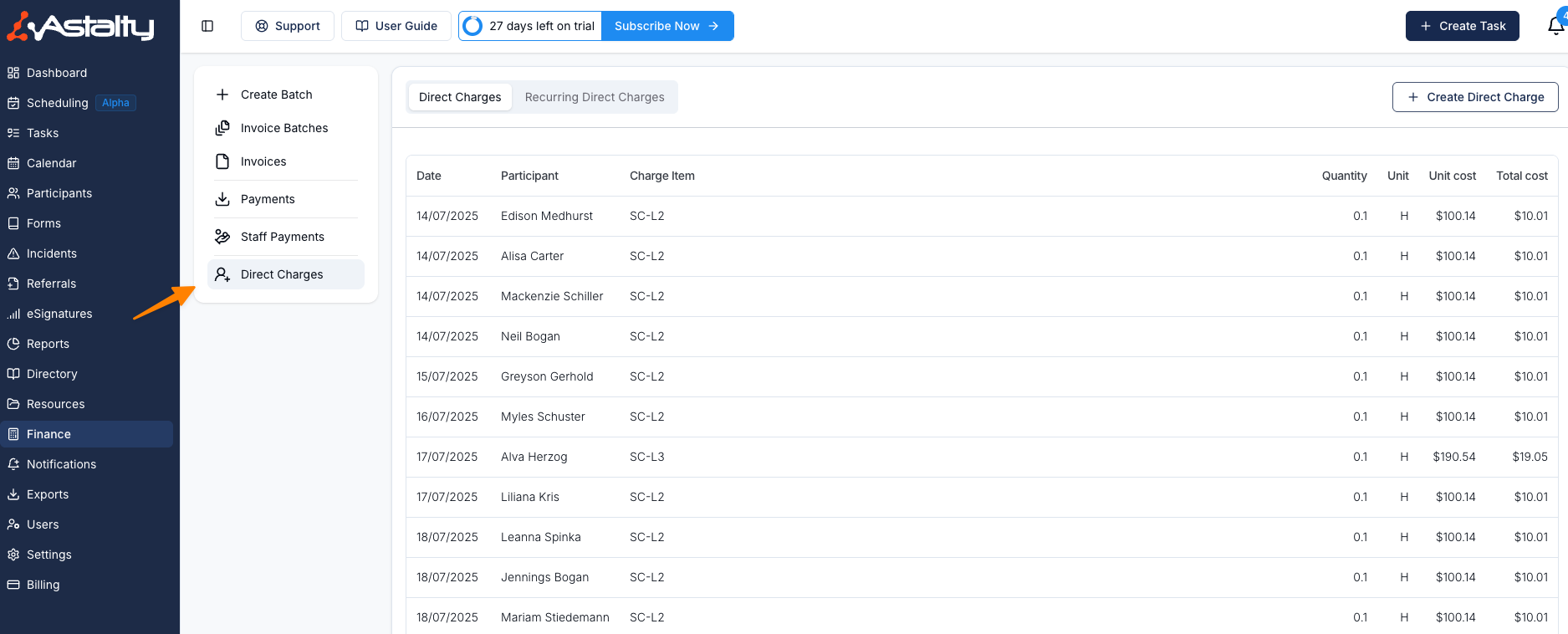
Creating Direct Charges
To create a direct charge:
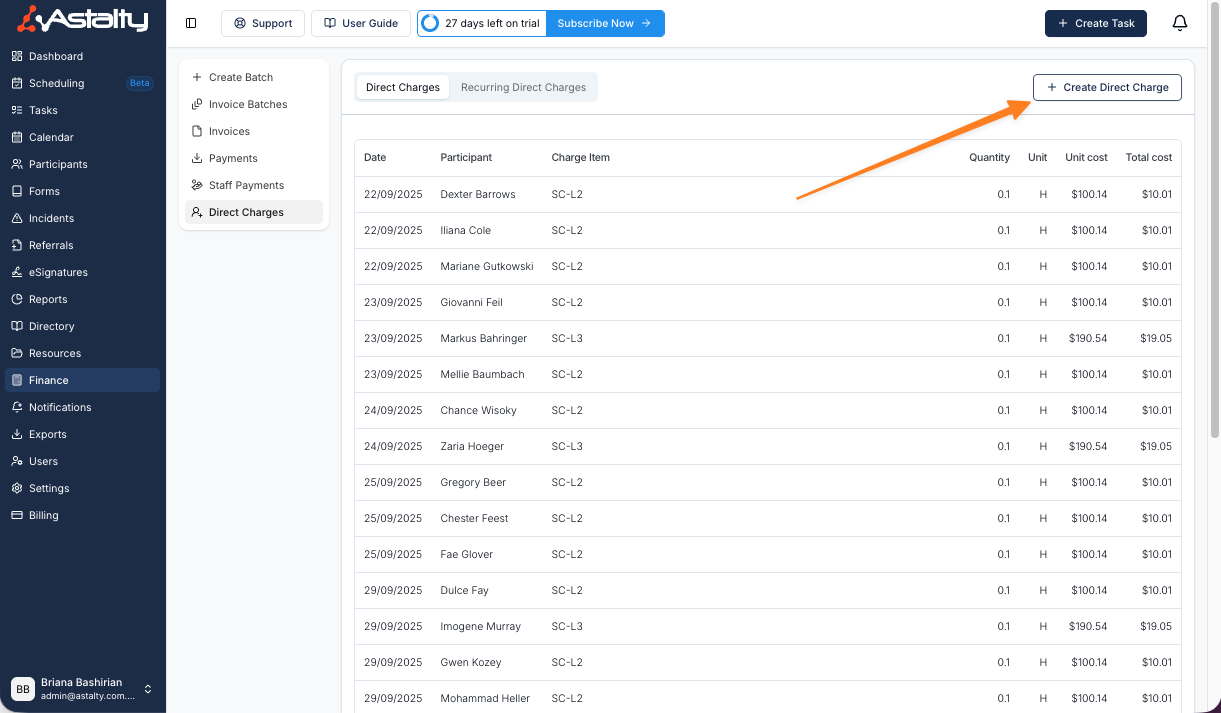
- Open Finance > Direct Charges.
- Select Create Direct Charge.
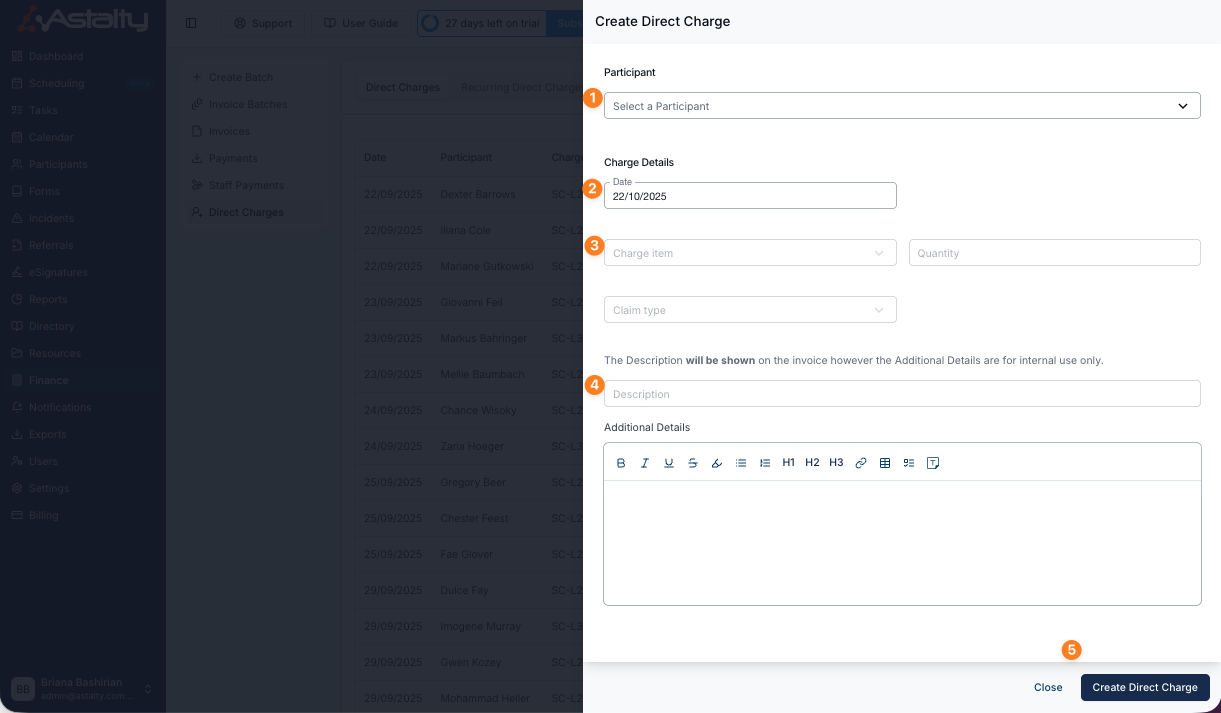
- Select the Participant and date.
- Choose the Charge Item, quantity and claim type.
- Enter the Description shown on the invoice. Add Additional Details for internal information.
- Review the Charge Summary, then select Create Direct Charge.
Recurring Direct Charges
Recurring Direct Charges create scheduled charges through the end date you choose.
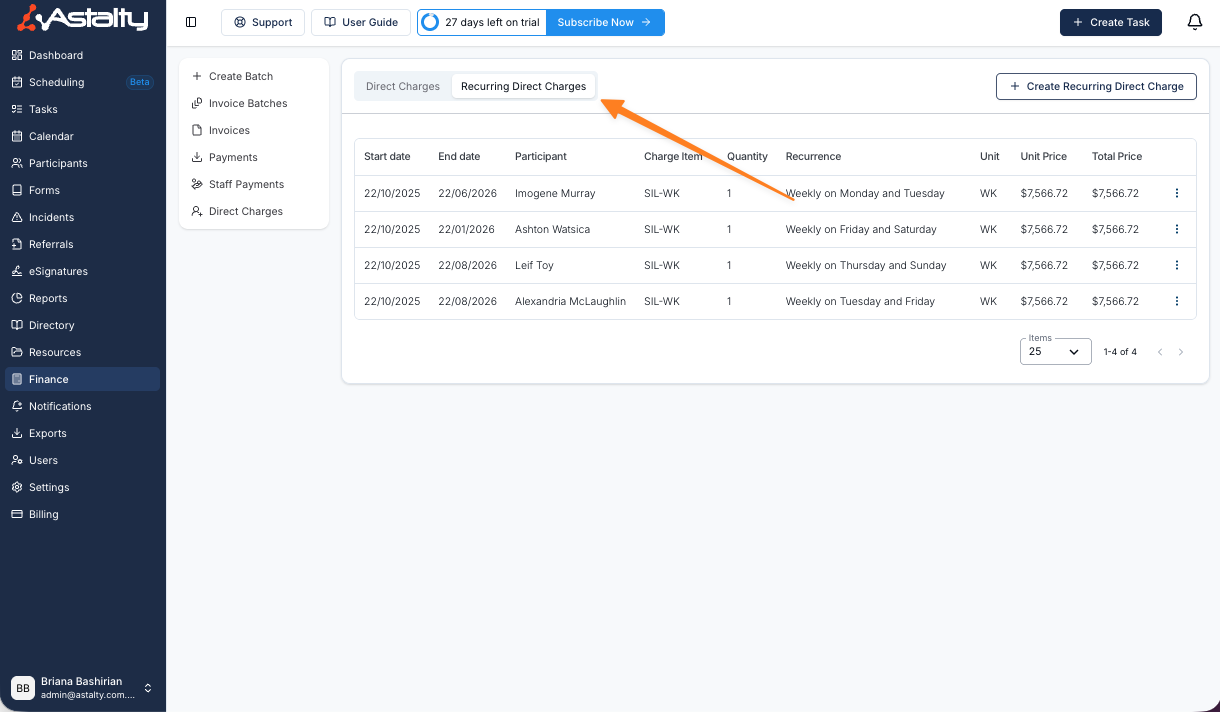
To create a recurring direct charge:
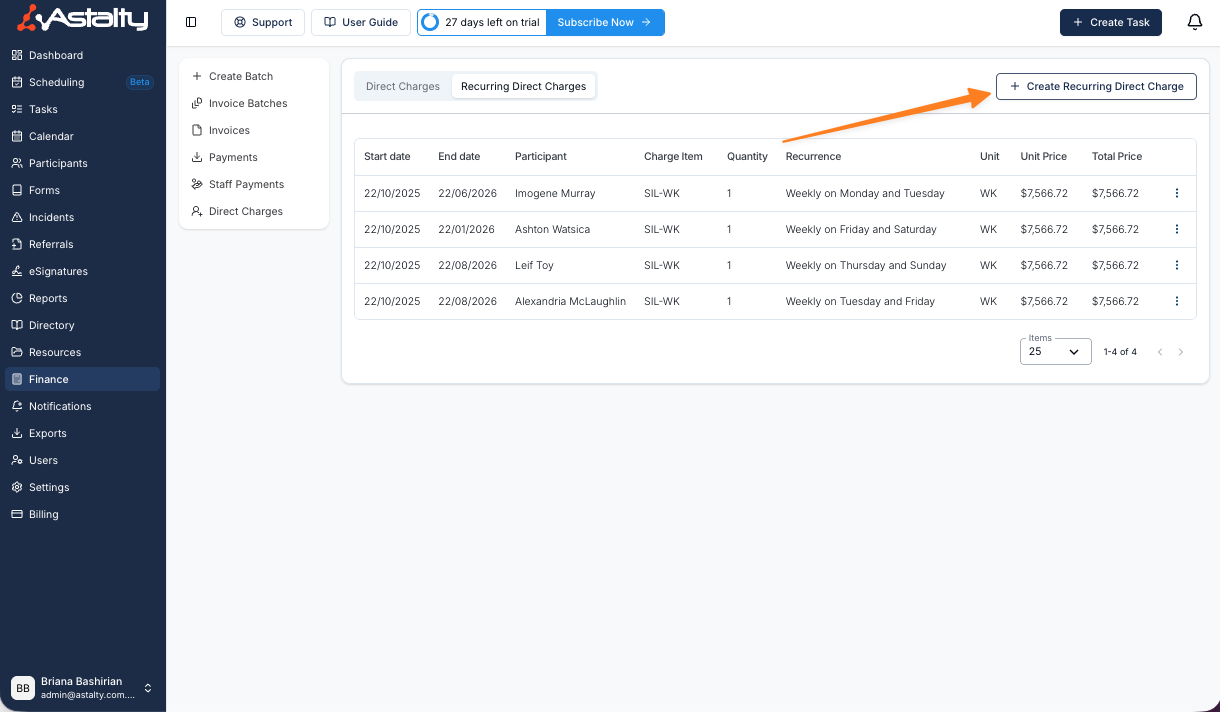
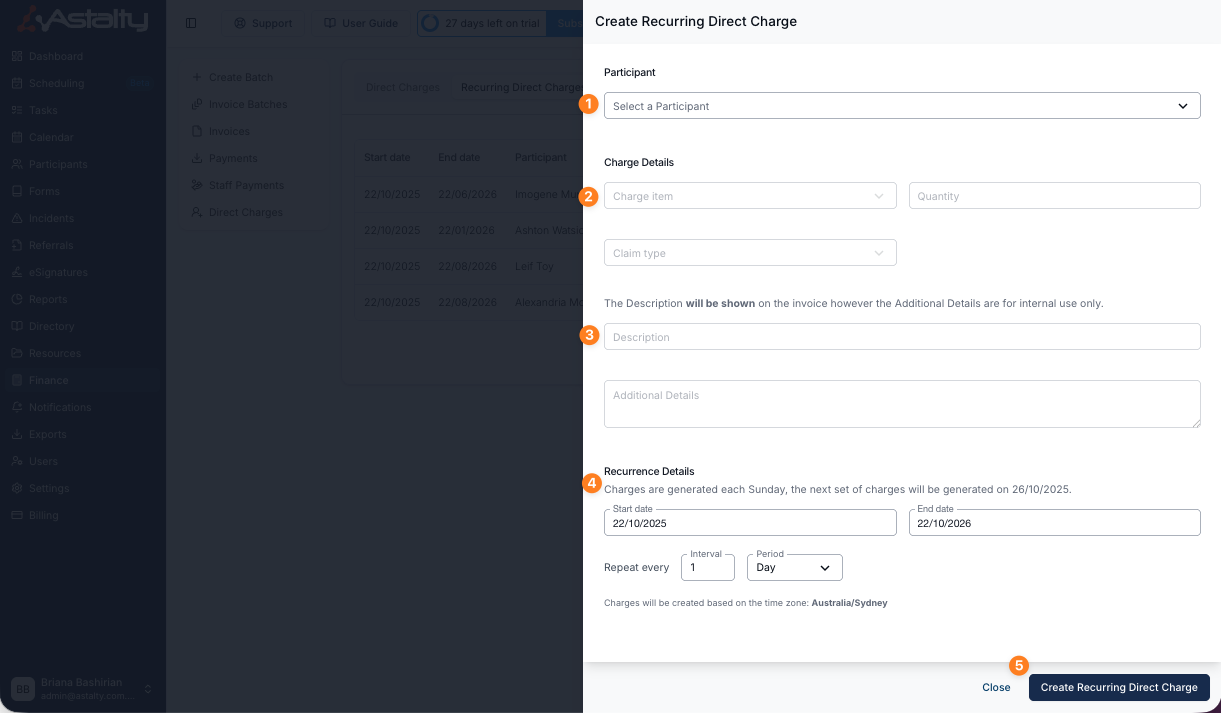
- Select Create Recurring Direct Charge.
- Select the Participant.
- Choose the Charge Item, quantity and claim type.
- Enter the Description shown on invoices. You can add a date range to the Description.
- Add Additional Details for internal information when needed.
- Set the start date, end date and repetition interval.
- Review the Charge Summary, then select Create Recurring Direct Charge.
Editing a Recurring Direct Charge
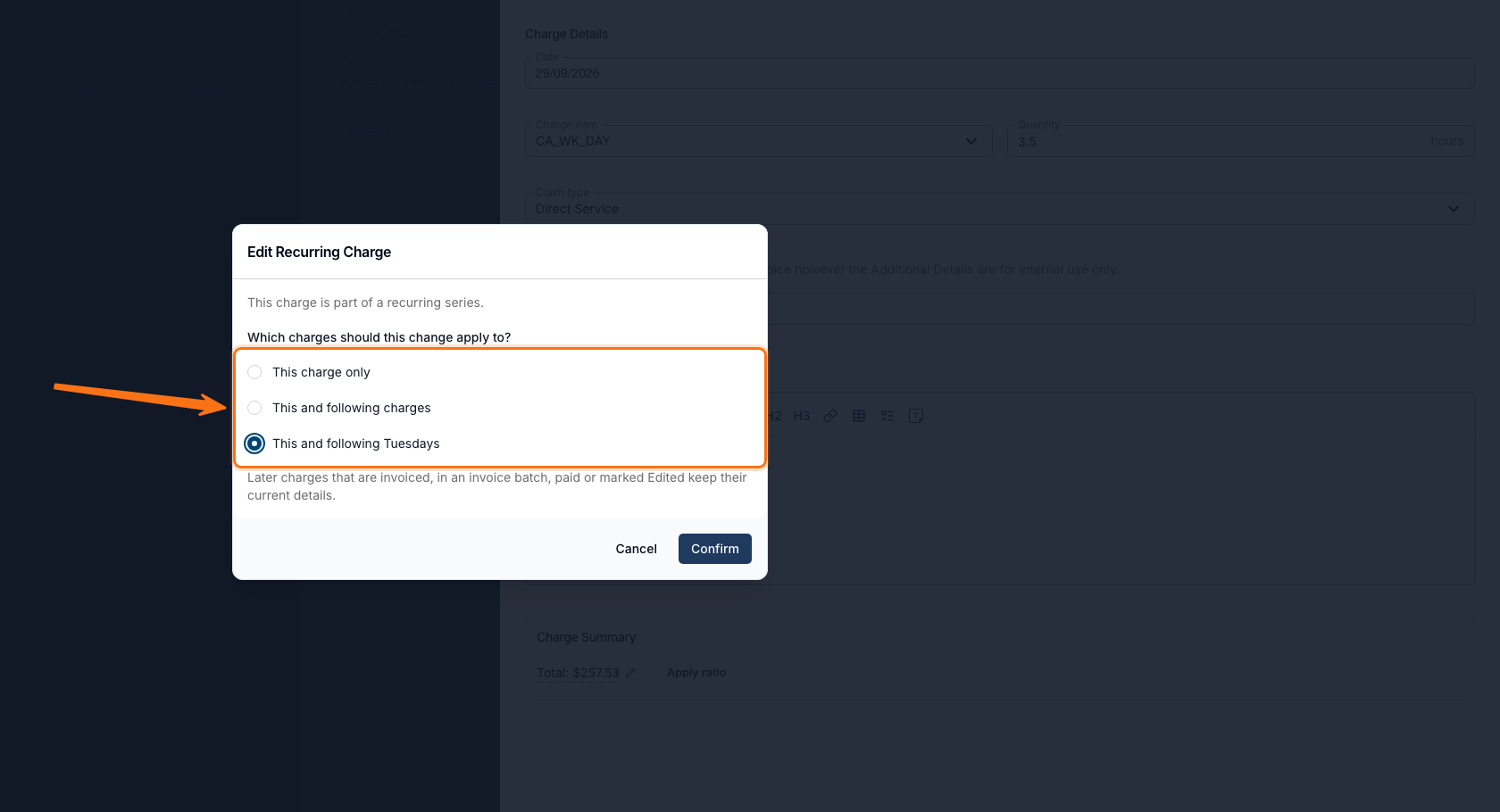
Go to Finance > Direct Charges > Recurring Direct Charges, click a series to see the charges it has generated, then click one to edit it. Saving a change to a charge that belongs to a series and hasn't been invoiced opens Edit Recurring Charge:
This charge is part of a recurring series. Which charges should this change apply to?
| Option | Applies the change to |
|---|---|
| This charge only | Just the edited charge. Selected by default. |
| This and following charges | The series and every not-yet-billed later charge, on every weekday - including weekdays previously edited with "This and following <Weekday>", whose own details are cleared back to the series' details. |
This and following <Weekday>s | Not-yet-billed later charges on the same weekday as the one edited, for example "This and following Tuesdays". Other weekdays are unaffected. Only offered when the series repeats on more than one weekday, or daily on an interval that isn't a multiple of seven. |
Later charges already invoiced, in an invoice batch, paid, or marked Edited keep their current details regardless of the option chosen. If the edit also moves the charge to a different date, the two "following" options are disabled and the change applies to that charge only.
Adding a Date Range to the Description
A recurring direct charge repeats the same Description on every charge it creates, so an invoice can end up with several identical lines. To show the period each charge covers, insert the Date Range placeholder into the Description - particularly useful for SIL, where the invoice needs to show which week was billed.
Placeholders are included with Astalty Premium, so there is nothing to switch on.
When you create or edit a recurring direct charge, select Insert placeholder above the Description field and choose Date Range. This adds ${DateRange} to the Description, and you can type your own wording around it - for example ${DateRange} Weekly SIL.

The Description keeps the ${DateRange} text on the recurring charge and on every charge it generates. The real dates are filled in when the invoice is generated, so the invoice line reads something like 02/01/2026 - 08/01/2026 Weekly SIL.
Backdating a Recurring Direct Charge
You can set the Start Date of a new recurring direct charge to a date that has already passed. When you save, Astalty creates every occurrence from that start date through the selected end date. Previously you had to add each missed period by hand as an individual one-off direct charge.
As soon as you choose a past start date, the form confirms what will happen:
The start date is in the past, so the charges it has already missed are created as well.
Backfilled charges are no different to any other charge the recurrence produces. They carry the same Charge Item, quantity, claim type, description and any ratio or item total you set, and each one is dated to the day it would have fallen on - so they land in the invoice period they belong to rather than today's.
Applying a Ratio
When creating or editing a direct charge, you can apply a ratio to apportion the total automatically instead of editing the item total by hand. This is handy for charges you only want to bill a portion of - for example, a shared support split between Participants.
Once you've selected a Participant, Charge Item, and quantity, a Charge Summary appears at the bottom of the form. By default it shows the calculated Total with a pencil to set it manually, alongside an Apply ratio option.
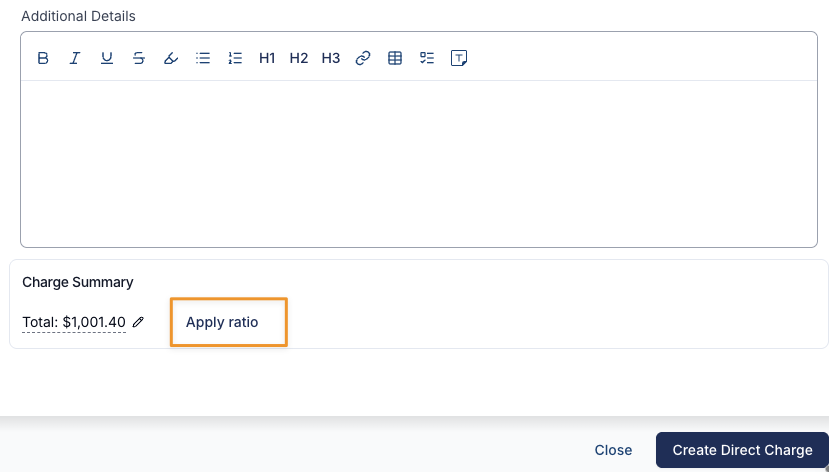
Select Apply ratio to enter a ratio as a Numerator and Denominator (for example 1 : 2). The Charge Item price is apportioned by that ratio and the percentage is shown as you type - so 1 : 2 applies 50% of the price, and the total updates instantly.
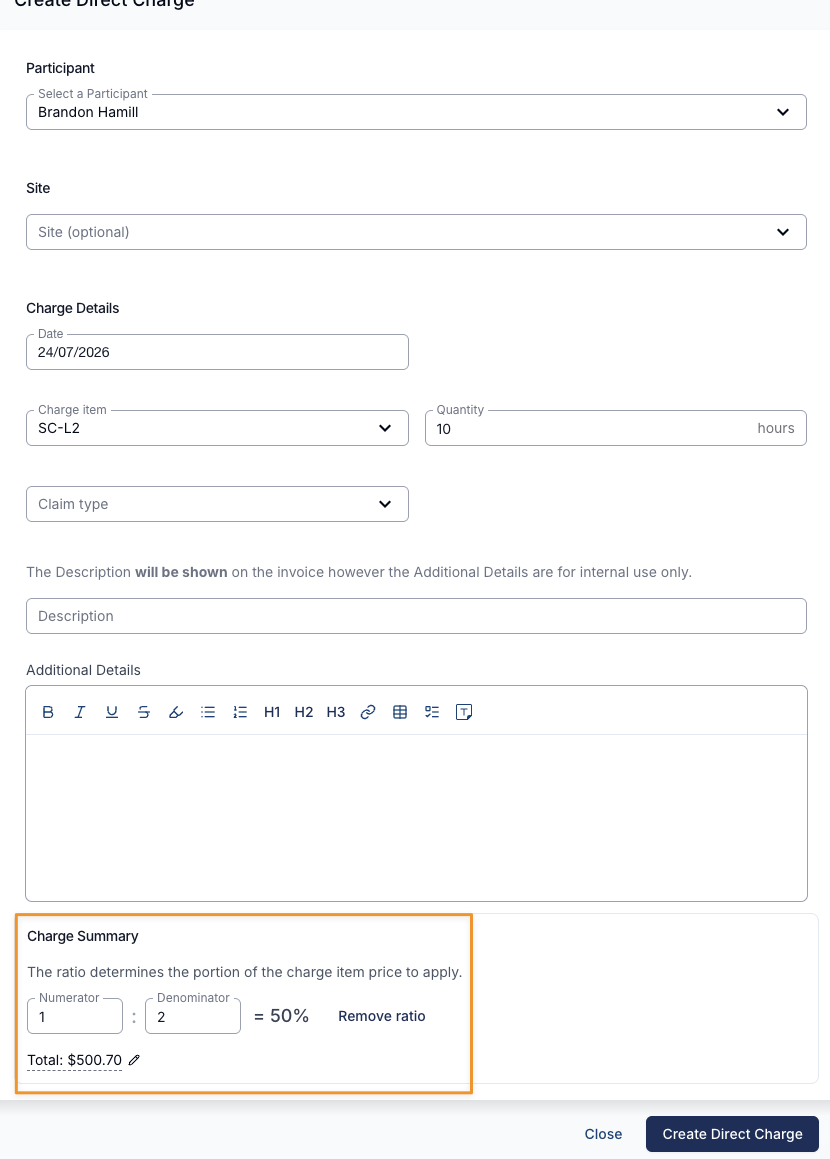
Select Remove ratio to clear it and return to the standard total.
Ratios work for both one-off and recurring direct charges wherever Direct Charges is enabled - there's no separate setting to switch on. For a recurring direct charge, the ratio is applied to every charge it generates and is shown on the charge details.
Raising a Direct Charge From a Budget Item
You can start a one-off direct charge from a Participant's budget rather than from the Direct Charges list. On the budget, open the overflow menu on a budget item and select Create Direct Charge. The option appears only on items built from one of your Charge Items - an item taken from the NDIS Price Guide has nothing to charge against.
The drawer shows the budget item's name, Charge Item and total in a read-only panel, and sets the date to today. Everything else - quantity, claim type, description, Additional Details and site - is blank, so fill it in as you would on any direct charge.
Where the budget item has a support ratio, it is carried across and applied to the charge. It sits in the Charge Summary, which only appears once you enter a Quantity - so a drawer you have just opened shows no ratio even though one is already set.
See Budget Functionality for the full walkthrough.
Cloning a Charge
When you need a charge that's almost identical to one you already have - the same Participant and Charge Item, with a different date or recurrence - clone it instead of filling in the form from scratch. Cloning opens the normal create form with the original's details already filled in, so you only change what's different. The original charge is left untouched, and the clone is saved as a brand new charge.
Cloning a Recurring Direct Charge
To clone a recurring direct charge:
- Go to Finance > Direct Charges > Recurring Direct Charges
- Click the actions menu (⋮) at the end of the charge's row
- Select 'Clone Charge'

The Create Recurring Direct Charge form opens pre-filled from the original, including the:
- Participant, Charge Item, quantity and claim type
- Description and Additional Details
- Manually set total or applied ratio, if the original had one
- Linked Site, if the original was tied to one
- Recurrence details - start date, end date, repeat interval and period, and the days or day of the month it repeats on
Change whatever you need, then click Create Recurring Direct Charge to save the clone.
You can clone a recurring charge from a site as well - open the site, go to the Recurring Charges tab and use the same actions menu on the row. Cloning from a site keeps the new charge on that same site. See Sites - Recurring Charges for more.
Cloning a One-Off Direct Charge
To clone a one-off direct charge:
- Go to Finance > Direct Charges
- Click the charge in the list to open it
- Open the Actions menu at the top of the charge and select 'Clone Charge'
The Create Direct Charge form opens pre-filled with the original's Participant, date, Charge Item, quantity, claim type, description, additional details, any manual total or ratio, and the linked Site.
Direct Vs Recurring Charges
| One-Off vs Recurring Direct Charges | ||
|---|---|---|
| Feature | One-Off Direct Charge | Recurring Direct Charge |
| Purpose | Bill for a single, standalone charge not linked to a scheduled support or task. | Bill for the same charge on a set schedule (daily, weekly, or monthly). |
| Examples | One-time respite charge, single SIL charge, centre capital costs for a specific day. | Regular weekly respite charge, monthly SIL billing, ongoing centre capital costs. |
| Required Details | Participant, Charge Item, quantity, claim type, description, additional details (optional). | Same as one-off: Participant, Charge Item, quantity, claim type, description, additional details (optional). |
| Recurrence Options | Not applicable. | Set start date, end date, and recurrence interval (daily, weekly, monthly). |
| When to Use | When the charge will only be applied once. | When the same charge will be applied on a regular, repeating schedule. |
Searching for Direct Charges
The search bar in both Direct Charges and Recurring Direct Charges allows you to search by Participant or Charge Item, helping you quickly refine results and more easily identify active Direct Charges.
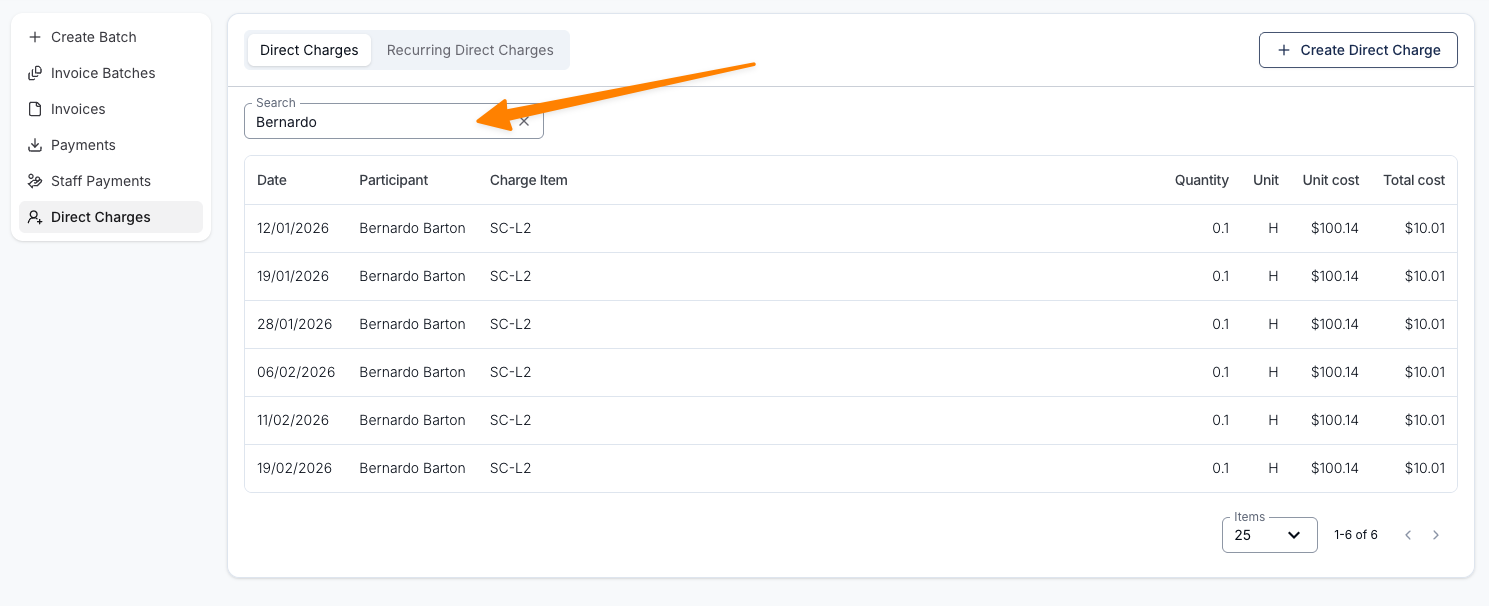
Reviewing a Charge's History
Use the Audit Trail to check who changed a direct charge, when they changed it and which values changed.
- Open Finance > Direct Charges and select the charge. For a recurring charge, open the series and select the individual charge you want to review.
- Select Actions > Audit Trail.
- Review the entries, newest first. Use Search to find a particular change.
The history belongs to the individual charge. Opening it from a recurring series does not show the history of every charge in that series. Viewing the trail does not change the charge or its invoice.