How To Roster a Sleepover Support
Overview
Use a sleepover support when a worker sleeps at the location and may provide support during the night. The video demonstrates the scheduling workflow.
Sleepover supports may be scheduled in a variety of scenarios, such as:
- In-Home Supports
- Supported Independent Living (SIL) Supports
- Respite
Billing Sleepover Supports
- For In-home supports, you may wish to use the relevant Charge Item Set so the correct NDIS line items are applied when billing.
- For Respite (STA), use a Short Term Accommodation Charge Item Set - both presets include the per-night sleepover Charge Item. See How to Claim for Respite?.
- For SIL supports, you may choose to use Direct Charges instead.
See Direct Charges for setup and charging instructions.
Sleepover Duration
The form saves a sleepover of any length. Scheduling Award Alerts check it in the Suggested Support Worker table as you choose a worker, and in the Schedule Alerts report once it is rostered: SCHADS flags a sleepover shorter than eight hours, and Aged Care flags one outside eight to ten hours. A saved support is not confirmation that the award conditions are met.
Sleepovers within a package that crosses midnight
A sleepover is normally rostered as part of a package of supports that crosses midnight - for example an evening shift, the 8-hour sleepover, then a morning shift the next day.
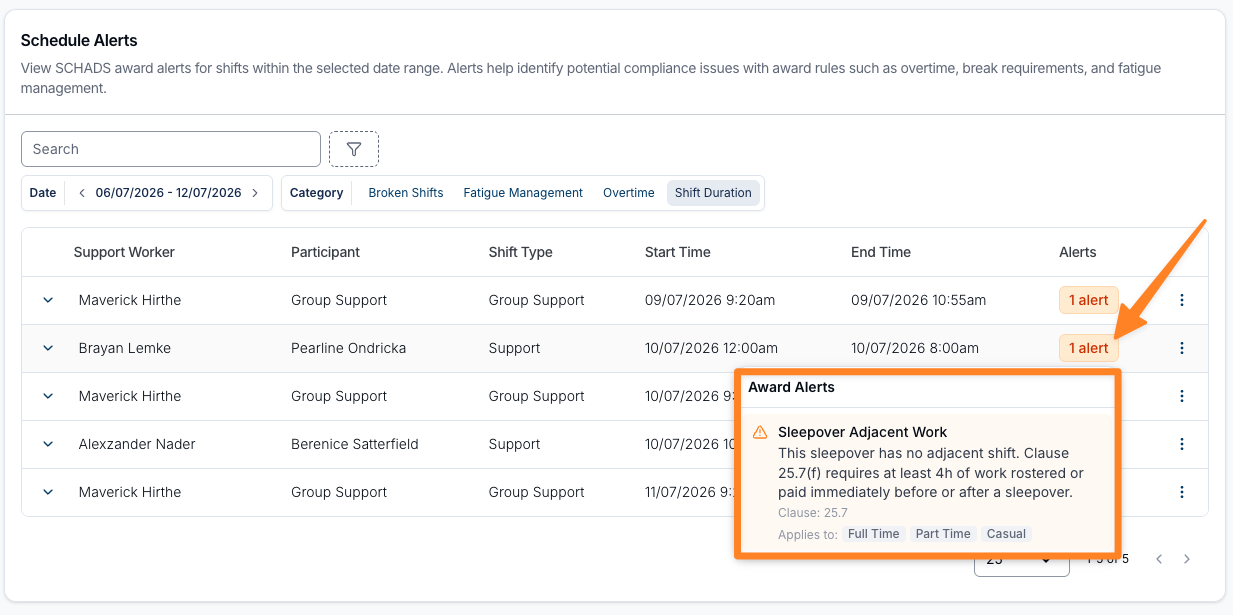
Under the SCHADS Award (clause 25.7(f)), the worker must be rostered - or paid - for at least 4 hours of ordinary work on at least one side of the sleepover, meaning the shift entered immediately before and/or immediately after it. If a sleepover is saved without at least 4 hours of shift entered on either side, Astalty captures a SCHADS scheduling award alert. Add or extend the adjacent work where appropriate, or arrange the required payment in payroll. Pay Award Minimum Engagement does not automatically pay the four-hour sleepover-adjacent minimum.
Check the Worker's Award
SCHADS and Aged Care use different sleepover allowances and active-work rules. Review the applicable page before payroll.
Nurses and Health Professionals interpretations do not pay a passive sleepover or sleepover allowance. Roster their overnight work as active work and verify the applicable conditions. NDIS billing and employee award pay are separate calculations.