- Scheduling
- Scheduling FAQ
- Nurses Award Interpretations in Astalty
Nurses Award Interpretations in Astalty
Overview
Astalty uses the award on each worker's employment contract to interpret approved hours into pay categories and allowance quantities. This page describes the Nurses Award rules currently implemented, including the limits you need to check before payroll.
The Award Pay Report, Award Playground, interpreted Excel exports and Xero timesheet push use this interpretation. The Award Interpretation tab on a timesheet batch is available on every payroll platform. On Employment Hero, PayCat and QuickBooks Payroll, the payroll platform calculates award pay itself from the timesheets Astalty sends, so what it pays can differ from these figures. See payroll platform differences.
Who this award covers
Confirm coverage and classification against clause 4 of the Award, including its exclusions and any applicable enterprise agreement. Selecting an award in Astalty does not determine a worker's legal coverage.
The Nurses Award covers Registered Nurses, Enrolled Nurses, Nursing Assistants and Nurse Practitioners, subject to its coverage and exclusions. A nurse delivering NDIS nursing supports, working in a residential aged care facility or providing in-home care is on the Nurses Award, even where the rest of the workforce is on SCHADS or the Aged Care Award.
Nursing Assistants doing aged care work are the exception. Since 1 January 2025 they are on the Aged Care Award in a residential facility, and on SCHADS with a home care aged care classification in a client's home.
Putting a worker on the Nurses Award
The award is set on the worker's employment contract:
- Open the worker's User Profile and go to the HR tab.
- Create (or edit) their contract and set Award to Nurses Award.
- Choose their Nurses Classification and pay point. Leave Base Hourly Rate blank to use the loaded award rate for the pay period, or enter an intentional override. Choosing a classification does not change an existing amount; see Maintaining Award Rates.
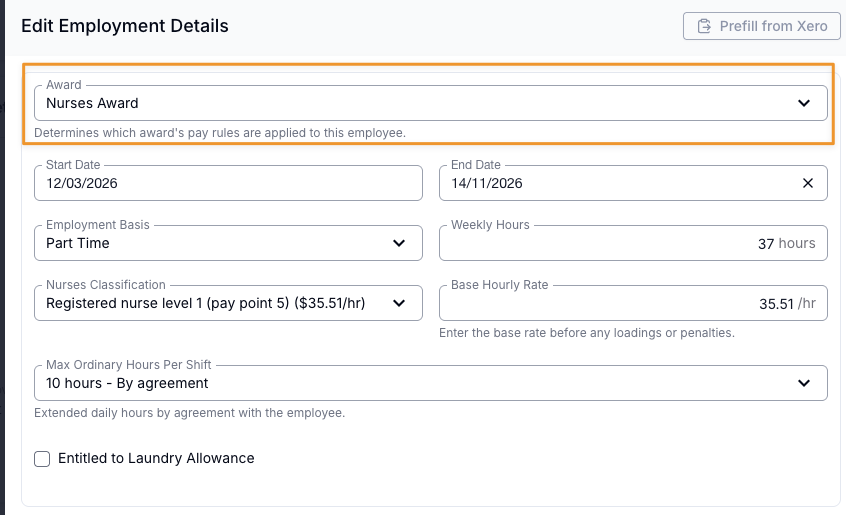
The classification list covers both rate tables. The general (non-aged-care) classifications come first - Nursing Assistants, Student and regular Enrolled Nurses, Registered Nurses (levels 1-5), Occupational Health Nurses and Nurse Practitioners, each with their pay points - followed by the aged-care classifications, prefixed Aged care -. SCHADS-only contract fields - the SCHADS Overtime Stream, First Aid Allowance entitlement and Minimum Break Near a Sleepover - do not apply to a Nurses Award contract and are hidden. See Staff Contracted Hours for the contract workflow.
Aged-care nurses
Registered and Enrolled Nurses working in aged care are covered by the Nurses Award, not the Aged Care Award. The Aged Care Award only covers the classifications listed in its own rates clause - and Registered and Enrolled Nurses are not among them. So an RN in a residential facility goes on a Nurses Award contract in Astalty.
Whether a nurse is an "aged-care employee" depends on the work they do, not who employs them. The Award covers services for aged persons in a residential facility and services for an aged person in a private residence - so a nurse doing in-home aged care is on the aged-care rates too, even where that provider's non-nurse staff are on SCHADS.
To put a nurse on the aged-care rates, choose a classification prefixed Aged care - when you set up their contract. With Base Hourly Rate blank, costing uses the applicable aged-care rate. An aged-care Registered Nurse level 1 in their first year is $41.36/hr from 1 August 2026, compared with $32.09/hr for the equivalent general classification from 1 July 2026.
Only the base rate differs between the two tables. Penalties, overtime bands, shift and casual loadings, and the dollar value of every allowance are identical - so aged-care nurses need no extra Xero pay items, and everything else on this page applies to them unchanged.
How your hours are interpreted
Shift loadings
A weekday shift attracts a loading based on when it starts and finishes. The loading applies to the whole shift:
| Weekday shift | Pay category | Loading |
|---|---|---|
| Day shift | Ordinary | - |
| Starts between noon and 6:00pm and finishes after 6:00pm | Afternoon shift | +12.5% |
| Starts at 6:00pm or later | Night shift | +15% |
Where a rule has a stricter and a looser reading, Astalty takes the reading that cannot underpay - for example, any shift starting at 6pm or later is classified as a night shift, without applying the Award's "finishing before 7:30am" carve-out.
Weekends and public holidays
| When worked | Full-time / part-time | Casual |
|---|---|---|
| Saturday | 150% | 187.5% |
| Sunday | 175% | 218.75% |
| Public holiday | 200% | 250% |
For overnight work, review public holiday boundaries: an ordinary shift's holiday flag can apply to the whole shift.
Ordinary hours and overtime
Astalty caps ordinary hours by continuous shift, calendar day and pay period. Hours beyond a cap become overtime, subject to the senior Registered Nurse exemption:
- Continuous shift - 10 ordinary hours, or a lower contract cap, including work across midnight.
- Calendar day - 10 ordinary hours, or a lower contract cap.
- Weekly / fortnightly - 38 hours per week, or 76 hours per fortnight.
Overtime from Monday to Saturday is paid at 150% for the first 2 hours and 200% after that. Sunday overtime is 200% and public holiday overtime is 250%.
Part-time employees do not receive overtime merely for exceeding their own contracted hours. Astalty uses the full-time daily and period limits.
Back-to-back shifts and adjoining travel count towards one continuous shift. A separately recorded unpaid meal break of 30-60 minutes preserves that grouping but adds no paid hours; a gap without a recorded break starts a new group. Meal-allowance thresholds also carry across this group, with each threshold paid once.
The first overtime band carries across midnight within a continuous shift. Overtime from any cap uses it up, including hours past the weekly limit and Sunday overtime running into Monday. With a 10-hour cap, a 12pm-2am shift pays 2 hours at 150% before midnight and 2 hours at 200% after it.
Casual employees
The 25% casual loading applies in two ways under this award:
- Shift loadings (afternoon and night) are added on top of the loaded rate - a casual on a night shift is paid 115% + 25% = 140%.
- Weekend, public holiday and overtime rates are compounded on the loaded rate - a casual working a Saturday is paid 150% x 1.25 = 187.5%, and a casual's first overtime band is also 150% x 1.25 = 187.5%.
Casual employees also have a 2-hour minimum engagement, flagged as a scheduling alert. Astalty pays a short engagement up to 2 hours only when Pay Award Minimum Engagement is on. Otherwise pay covers the approved hours only. Any break between two shifts starts a new engagement with its own minimum: with the setting on, a casual rostered 9am-10am then 10:15am-3pm is paid 6.75 hours.
Senior Registered Nurses
Registered Nurses at levels 4 and 5 are exempt from shift loadings, overtime and allowances under the Award - their hours are paid at the ordinary rate, with weekend and public holiday penalties still applying.
Allowances
- Overtime meal allowance - one meal once a shift's overtime exceeds one hour, and a second once it exceeds four hours. Turned on at Settings > Scheduling > Meal Allowance; it is off by default and shares its setting with the other awards.
- Laundry allowance - per shift, capped weekly, for workers with the laundry entitlement on their contract.
- Uniform allowance - per shift, capped weekly, for workers with the uniform entitlement on their contract.
- Kilometre / vehicle allowance - per kilometre, for approved travel in a worker's own vehicle.
Astalty uses allowance rates loaded for the pay period. It does not retrieve changes live from Fair Work or update rates in Xero. Check both systems after a rate change; see Maintaining Award Rates.
Astalty calculates rostered on-call allowances and approved remote activations recorded through the On-Call Roster. Access to record them requires the On-Call Roster beta to be enabled for your account. Remote Work (Not On Call) is not supported for Nurses Award contracts.
The telephone allowance and the award's other minor allowances are not calculated - see What Astalty covers under this award.
Meal provision and notice conditions need a separate check; the automatic meal setting uses overtime thresholds. Uniform allowance during eligible leave is not generated from rostered shifts, so check it in payroll.
Scheduling alerts
Astalty raises alerts while you roster, before the hours reach payroll:
- Minimum engagement - 2 hours, casual employees only
- Minimum 10-hour break between shifts, subject to the same-day checking limitation
- Maximum shift length of 10 hours (or the lower contract cap), measured across the continuous shift
- Insufficient days off - two full days per week, or four per fortnight, for permanent employees
See Scheduling Award Alerts for how alert behaviour is configured.
Where you see the interpretation
- Award Interpretation tab on a timesheet batch - the per-worker breakdown for the shifts in that batch.
- Award Pay Report - the same breakdown across a full pay period.
- Award Playground (under Scheduling > Award Playground) - experiment with hypothetical work records. Select a worker whose contract is on the Nurses Award and the playground interprets under the Nurses rules. Sleepover scenarios don't apply - this award has no sleepover provisions, so sleepover templates are hidden.
- Interpreted Excel exports and the Xero timesheet push use the pay categories and allowances described here. Other payroll exports can contain raw timesheet records; see payroll platform differences.
Each worker's expanded view includes the interpretation trace showing which Nurses Award rules were applied - which cap was reached, which overtime band was used, and why.
Setting up Xero pay items
Pay items are mapped per pay group, and one pay group's mapping can only encode one award's rates. Nurses Award staff therefore need their own pay group, with pay items set up for the Nurses rates.
Whilst we cannot provide payroll advice based on your interpretation and application of the Nurses Award 2020, these are the Pay Items and their suggested multipliers when setting up Xero pay items for a Nurses Award pay group. You should refer to the Award, or seek professional and qualified advice, to ensure accuracy and compliance for your organisation.
| Pay Item | Full-time / Part-time (Multiplier) | Casual (Multiplier) | Notes |
|---|---|---|---|
| Weekday Daytime | 1 | 1.25 | Also known as 'Standard' |
| Afternoon | 1.125 | 1.375 | Casual = loading added on top (1.125 + 0.25) |
| Night | 1.15 | 1.4 | Casual = loading added on top (1.15 + 0.25) |
| Saturday | 1.5 | 1.875 | Casual = 1.5 x 1.25 |
| Sunday | 1.75 | 2.1875 | Casual = 1.75 x 1.25 |
| Public Holiday | 2 | 2.5 | Casual = 2 x 1.25 |
| Overtime 1st Period | 1.5 | 1.875 | First 2 hours, Mon-Sat |
| Overtime Last Period | 2 | 2.5 | After the first 2 hours, Mon-Sat |
| Overtime Sunday | 2 | 2.5 | Must be mapped - differs from the ordinary Sunday rate |
| Overtime Public Holiday | 2.5 | 3.125 | Must be mapped - differs from the ordinary Public Holiday rate |
| Kilometre Allowance | Per-km | ||
| Laundry Allowance | Only for workers with the laundry entitlement | ||
| Uniform Allowance | Only for workers with the uniform entitlement | ||
| Meal Allowance | Only if automatic meal allowances are turned on | ||
| Meal Allowance (Second) | Only if automatic meal allowances are turned on | ||
| All Casual multiplier rates are inclusive of the casual loading. |
If you use the On-Call Roster, also map the three Nurses on-call pay items for the standby allowance. See Mapping On-Call Pay Items.
For the mapping workflow itself, see Setup Pay Items and Employee Templates in Xero and Setup Pay Groups and Employees in Astalty.
Frequently asked questions
Why didn't overtime apply for my part-time nurse who worked beyond their contracted hours?
Under the Nurses Award, overtime for a part-time employee starts only once they work beyond full-time hours - more than 10 ordinary hours in a shift, or more than 38 hours in a week (76 in a fortnight) - not when they pass their own contracted hours. Hours between their contracted hours and full-time hours are paid at ordinary rates.
Why is a Registered Nurse level 4/5 not receiving penalties or overtime?
Registered Nurses at levels 4 and 5 are exempt from shift loadings, overtime and allowances. Weekend and public holiday penalties still apply, for both general and aged-care classifications. Check the classification and mapped pay items if those penalties are missing.
When does a meal allowance apply?
Using the shared Meal Allowance setting: when automatic meal allowances are turned on (Settings > Scheduling > Meal Allowance), a Nurses Award worker receives one meal allowance once a shift's overtime exceeds one hour, and a second once it exceeds four hours. The second allowance has its own Meal Allowance (Second) Xero pay item. It is off by default.
Can I put an aged-care nurse on the Nurses Award?
Yes - that is where they belong. Choose a classification prefixed Aged care - on their contract and they are costed at the higher aged-care rates. See Aged-care nurses.
Shouldn't an aged-care nurse go on the Aged Care Award instead?
No. The Aged Care Award covers only the classifications in its own rates clause, and Registered and Enrolled Nurses are not among them - the Nurses Award includes eligible nursing work in residential and in-home aged care, subject to its coverage clause. Put your aged-care nursing staff on a Nurses Award contract with an Aged care - classification, and your aged-care personal care and support staff on the Aged Care Award.
How do I tell Astalty a nurse works in aged care?
There is no separate switch - it is part of the classification you pick. Selecting an Aged care - classification is how you record it, but an explicit Base Hourly Rate can still be stale or incorrect. Check the amount as well as the classification.
Why can't I find an aged-care Nursing Assistant classification?
Because the Award no longer has one. Nursing Assistants providing care to aged persons moved out of the Nurses Award - in a residential facility they are covered by the Aged Care Award, and in a client's home by SCHADS. The Nurses Award Nursing Assistant classifications remain for non-aged-care settings such as hospitals.
Who updates pay rates after the Annual Wage Review?
You maintain your payroll rates and check the rate stored on each Astalty contract. See Maintaining Award Rates.
Can Astalty tell me if my roster complies with the Nurses Award, or give payroll advice?
Astalty gives you the tools - the interpreter, the per-worker interpretation trace, the scheduling alerts and the playground - but it cannot give payroll advice or confirm compliance for your organisation. How the Award applies to your situation is your decision; refer to the Award or seek qualified advice.
What Astalty covers under this award
| Area | Rule / behaviour | Supported? |
|---|---|---|
| Minimum rates | General (non-aged-care) minimum rate table | Yes |
| Aged-care employee minimum rate table, including the August 2026 increase | Yes | |
| Schedule F retained-rate protection selected automatically | No | |
| Aged-care Enrolled and Registered Nurse classification structure (single EN classification, RNs banded by years at level) | Yes | |
| Classification - ordinary & penalties | Weekday daytime vs afternoon vs night shift loadings | Yes |
| Saturday, Sunday and public holiday rates | Yes | |
| Registered Nurse levels 4 and 5 exempt from shift loadings, overtime and allowances | Yes | |
| Ordinary hours caps & overtime | 10-hour calendar-day cap (or a lower contract cap) | Yes |
| Continuous-shift cap across midnight, including adjoining work and recorded unpaid meal breaks | Yes; earlier-period adjoining work is carried into the later calculation | |
| Weekly / fortnightly ordinary caps (38h / 76h) | Yes | |
| Mon-Sat overtime banding (first 2 hours at 150%, then 200%), with the first band carried across midnight within a continuous shift | Yes; earlier-period overtime can carry the band forward | |
| Sunday overtime and public holiday overtime rates | Yes | |
| Part-time overtime only once hours exceed full-time hours (not the worker's contracted hours) | Yes | |
| Casual employment | 25% casual loading | Yes |
| Casual shift loadings added on top; weekend, public holiday and overtime rates compounded | Yes | |
| 2-hour minimum engagement for casuals (alert) | Yes | |
| Short engagements paid up to the minimum engagement (off by default) | Yes | |
| On-call & remote work | Rostered on-call allowance and approved remote activations | Yes; the On-Call Roster beta must be enabled to record them |
| Remote Work (Not On Call) and on-site recall | No; record on-site work on the relevant shift | |
| Allowances | Overtime meal allowance (off by default) | Yes |
| Laundry allowance (per shift, capped weekly) | Yes | |
| Kilometre / vehicle allowance | Yes | |
| Allowance values selected from loaded rate schedules | Yes, subject to the rate limitations above | |
| Uniform allowance (per shift, capped weekly) | Yes | |
| Telephone or other minor allowances | No | |
| Breaks & rostering | Minimum 10-hour break between shifts (alert; same-start-date gaps are not checked) | Yes |
| Maximum shift length of 10 hours (alert) | Yes | |
| Two full days off per week, or four per fortnight, for permanent employees (alert) | Yes | |
| 8-hour break by mutual agreement (Astalty always measures against 10 hours) | No | |
| Pay consequence for an insufficient break (must be handled manually) | No | |
| Work through a meal break > overtime until the break is taken | No | |
| Not in this award | Sleepovers and broken shifts do not exist under MA000034 | n/a |
| TOIL & leave | Time-off-in-lieu (TOIL), leave entitlements, leave loading, public holiday substitution | No |
| Classification & higher duties | Automatic higher-duties pay, or determining a worker's classification level | No |
| Other | On-screen rule traces explaining which award logic applied | Yes |
Sources and Review
The supported-rules table describes Astalty's implemented product behaviour. It is not a legal or compliance assessment. Before payroll, check the current Nurses Award, the worker's arrangements, and Maintaining Award Rates.