- Scheduling
- Scheduling FAQ
- SCHADS Interpretations in Astalty
SCHADS Interpretations in Astalty
Overview
Astalty uses the award on each worker's employment contract to interpret approved hours into pay categories and allowance quantities. This page describes the SCHADS rules currently implemented, including the limits you need to check before payroll.
The Award Pay Report, Award Playground, interpreted Excel exports and Xero timesheet push use this interpretation. The Award Interpretation tab on a timesheet batch is available on every payroll platform. On Employment Hero, PayCat and QuickBooks Payroll, the payroll platform calculates award pay itself from the timesheets Astalty sends, so what it pays can differ from these figures. See payroll platform differences.
Who this award covers
Confirm coverage and classification against clause 4 of the Award, including its exclusions and any applicable enterprise agreement. Selecting an award in Astalty does not determine a worker's legal coverage.
SCHADS covers social and community services work - for an NDIS provider that is typically disability Support Workers and home care workers, whether they support Participants in the community or in the Participant's home.
Some similar roles belong on other awards: allied health professionals go on the Health Professionals Award, nurses on the Nurses Award, and residential aged care staff on the Aged Care Award. Aged care in a client's home is home care, so it stays on SCHADS with a home care aged care classification.
Putting a worker on the SCHADS Award
The award is set on the worker's employment contract:
- Open the worker's User Profile and go to the HR tab.
- Create (or edit) their contract - Award defaults to SCHADS Award.
- Choose their SCHADS Classification (level and pay point, or a home care classification). Leave Base Hourly Rate blank to use the loaded award rate for the pay period, or enter an intentional override. Choosing a classification does not change an existing amount; see Maintaining Award Rates.
A SCHADS contract also carries award-specific fields:
- SCHADS Overtime Stream: sets the first Mon-Sat overtime band, the minimum engagement, and whether broken shift rules apply (see SCHADS Overtime Stream).
- First Aid Allowance - enables the first aid allowance, with the quantity depending on employment basis and eligible hours. For a home care employee, tick it when you require them to hold a current first aid certificate and they are responsible, in a given week, for first aid to your other employees (clause 20.6).
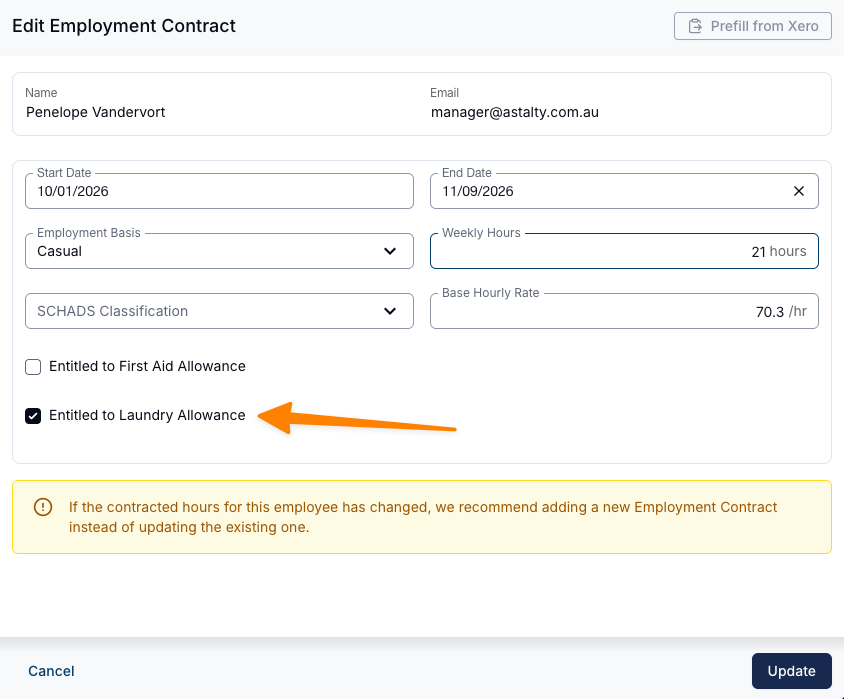
- Laundry Allowance - entitles the worker to the per-shift laundry allowance.
- Max Ordinary Hours Per Shift and Minimum Break Near a Sleepover - agreed variations used by the caps and alerts (see Staff Contracted Hours).
Home Care Classifications
Home care employees have their own SCHADS classifications, with their own rates. The SCHADS Classification list holds three sets:
| Set | Covers | Levels | Example |
|---|---|---|---|
| Social and community services (Schedule B) | Social and community services work, including disability services outside home care | Levels 1 to 8, each with pay points | SCHADS Level 3.1 |
| Home care disability (Schedule E) | Home care for a person with a disability, in a private residence | Levels 1 to 5: one pay point at level 1, two at levels 2 to 5 | Level 2.1, Home Care Disability |
| Home care aged care (Schedule F) | Home care for an aged person, in a private residence | Levels 1 to 6, with no pay points: Introductory, Home Carer, Qualified, Senior, Specialist and Team Leader | Level 3 Qualified, Home Care Aged Care |
Each option shows the hourly rate in effect today. Start typing part of a level's name to filter the list.
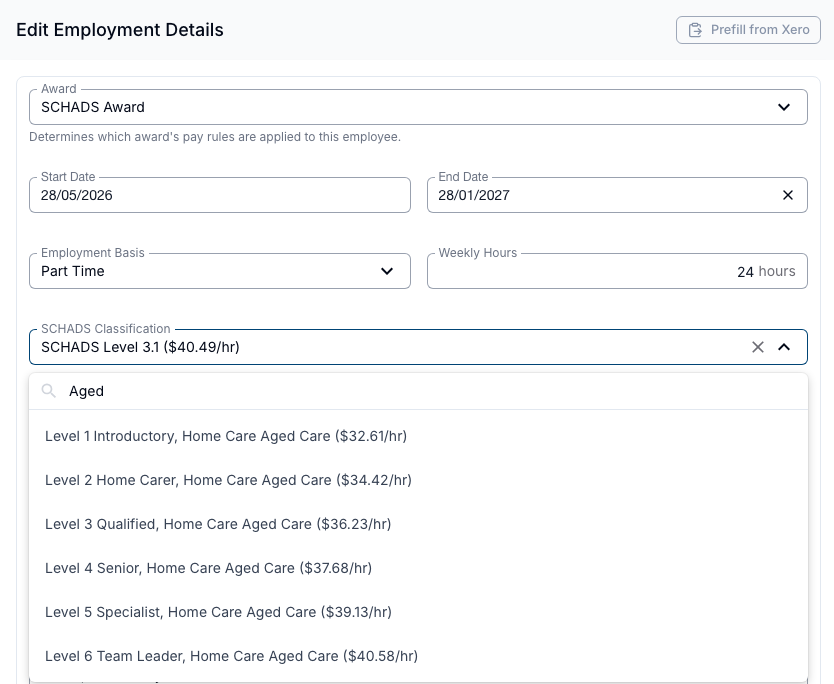
Choosing a home care classification sets the SCHADS Overtime Stream to Disability services & home care and locks it (see SCHADS Overtime Stream).
How your hours are interpreted
Shift loadings
Weekday shift loadings apply to the weekday hours of the shift, rather than only the hours after a clock-time boundary. Astalty also includes adjoining paid travel when establishing the engagement's start and finish.
| Weekday shift | Pay category | Loading |
|---|---|---|
| Day shift within 6:00am-8:00pm | Ordinary | None |
| Finishes after 8:00pm and by midnight, without meeting the night rule | Afternoon shift | +12.5% |
| Starts before 6:00am and finishes that weekday, or continues across midnight into another weekday | Night shift | +15% |
For example, a Monday 2pm-10pm shift attracts the afternoon loading for all eight hours. Paid travel immediately after it can change the finishing time used to select the loading. Weekend hours use the date worked. Public holiday treatment follows the shift's holiday flag; review public holiday boundaries for an overnight shift. The early-morning portion of a broken shift has a separate exception described under Broken shifts.
Weekends and public holidays
| When worked | Full-time / part-time | Casual |
|---|---|---|
| Saturday | 150% | 175% |
| Sunday | 200% | 225% |
| Public holiday | 250% | 275% |
Ordinary hours and overtime
Ordinary hours are capped daily and across the pay period. Hours beyond a cap become overtime:
- Daily and continuous shift - the contract cap, normally 8 hours or 10 by agreement. The continuous-shift cap applies to pay periods starting on or after 1 June 2026; earlier periods use the daily cap only. A 12-hour selection applies only to a qualifying combined sleepover shift under the June 2026 rules; other shifts remain capped at 10 hours. See Max Ordinary Hours Per Shift.
- Weekly / fortnightly - 38 hours per week, or 76 hours per fortnight.
For pay periods starting on or after 1 June 2026, work that continues across midnight is treated as one continuous shift, not two separate days - a 3pm-11pm shift that continues 11pm-7am is a single 16-hour shift with 10 ordinary hours and 6 hours of overtime when a 10-hour cap applies. Earlier pay periods apply the cap to each calendar day, so that double stays under the daily cap on both days.
For pay periods starting on or after 1 June 2026, a recorded unpaid meal break of 30-60 minutes does not end the shift. With a 10-hour cap, 6pm-11:30pm, a break to midnight, then midnight-6:30am is one 12-hour shift: 10 hours ordinary and 2 hours overtime. Any other gap, apart from a sleepover, starts a new shift, and a meal break never forms a broken shift.
Overtime from Monday to Saturday is paid at 150% for the first band and 200% after that - the first band is 2 hours, or 3 hours for full-time workers on the Social, Community & Crisis Accommodation stream. Sunday overtime is 200% and public holiday overtime is 250%.
For pay periods starting on or after 1 June 2026, the first band carries across midnight within a continuous shift. Overtime from any cap uses it up, including Sunday overtime running into Monday. With a 10-hour cap:
- 12pm-8pm followed by 8pm-4am pays 2 hours at 150% before midnight and 4 hours at 200% after it.
- 11am-10pm, a sleepover, then 6am-8am pays 2 hours at 150% and 1 hour at 200%, because the work either side of a sleepover is one shift.
For earlier pay periods, the first band restarts at midnight. Separate shifts on the same day, including the periods of a broken shift, share that day's first band.
Casual employees
The 25% casual loading is added on top of every rate - ordinary, penalty and overtime alike. A casual working a Saturday is paid 150% + 25% = 175%, and a casual's first overtime band is 150% + 25% = 175%. This differs from the Aged Care and Health Professionals awards, where overtime compounds the loading instead.
Part-time and casual employees have a minimum engagement of 2 hours, or 3 hours on the Social, community & crisis accommodation stream. A shorter engagement raises a scheduling alert. Astalty pays it up to the minimum only when Pay Award Minimum Engagement is on. Otherwise pay covers the approved hours only.
On the Disability services & home care stream, a shift that starts within 2 hours of the start of an engagement joins it, and with the setting on the break is paid as time worked. With the setting on and Broken Shift Minimum Gap left empty, so the day is not a broken shift, a part-time or casual worker rostered 9am-10am then 10:15am-3pm is paid 6 hours: 5.75 hours worked plus the 15-minute break. On the Social, community & crisis accommodation stream the same roster is paid 7.75 hours, because each shift takes its own 3 hours (see SCHADS Overtime Stream).
Broken shifts
A broken shift is a day with 2 work periods and 1 unpaid break, or - by agreement - 3 work periods with 2 unpaid breaks. Astalty detects these automatically and pays:
- A broken shift allowance - a higher allowance for two unpaid breaks than for one.
- Double time for any work beyond a 12-hour span, measured from the start of the first portion to the end of the last.
- An early-morning leg on a broken-shift day does not attract the night loading.
The Award's broken shift clause (25.6) covers only disability services work and home care employees, so none of these rules apply to a worker on the Social, community & crisis accommodation stream. See SCHADS Overtime Stream.
By default, a broken shift forms once the next work period starts more than 2 hours after the earlier one began, or after it ends, whichever is later - a shorter gap joins the two periods into one engagement instead (see the Disability services & home care example above). Set a provider-level Broken Shift Minimum Gap under Settings > Scheduling to use a fixed cutoff instead - gaps up to that many minutes are treated as continuous work.
Sleepovers
A sleepover attracts an allowance per night, and the passive sleepover span is excluded from ordinary and overtime hours. Active work when the worker is woken is paid separately at the overtime rate, with a minimum of 1 hour per sleepover - all disturbances in the one night are added together before the minimum is applied, rather than each attracting their own. The Award also expects at least 4 hours of active work rostered on at least one side of the sleepover, and a 8-hour sleepover span - both raise scheduling alerts when breached. Astalty does not automatically pay the four-hour minimum beside a sleepover; the minimum-engagement top-up setting excludes sleepover-adjacent work.
Use one support with a Sleepover Window, or separate supports for active work before, the passive sleepover and active work after. Both provide separate records for interpretation; see Creating a Sleepover or Active Overnight Support.
SCHADS Award changes from 1 June 2026
The interpreter automatically applies the SCHADS Award variation that took effect on 1 June 2026. Astalty selects the correct rules based on the pay period's dates, so no setting needs to change - periods that start on or after 1 June 2026 are interpreted under the updated rules, and earlier periods continue to use the previous rules.
From 1 June 2026 the interpreter changes how sleepovers interact with the work around them:
- A sleepover no longer counts as a rest break. Time spent on a sleepover is excluded when measuring the break between the shifts on either side of it, so a sleepover sitting between two shifts can no longer satisfy the minimum-break requirement on its own.
- Work on either side of a sleepover is treated as one continuous shift. The work performed before and after a sleepover is combined when calculating hours and overtime, rather than being measured as two separate shifts.
- Extended ordinary hours by agreement. Where the worker has agreed, the combined sleepover shift can have an ordinary-hours cap of up to 12 hours (instead of the standard 10), with no more than 8 ordinary hours on either side and hours beyond the applicable cap paid as overtime.
24-hour Care
Under clause 25.8, a home care employee on a 24-hour care shift is paid 8 hours at 155% for each 24-hour period, instead of the hours they work. Casuals are paid 180%, which includes their 25% loading. The rate is the same on a weekend or public holiday.
Only workers on a home care classification (Schedule E or F) are paid this way. Anyone else on a 24-hour care shift is paid the hours they work.
Marking a Support as 24-hour Care
- Set the support's times to run for 24 hours, for example 9:00 AM to 9:00 AM the next day.
- Tick 24-hour care shift.
- Save the support.
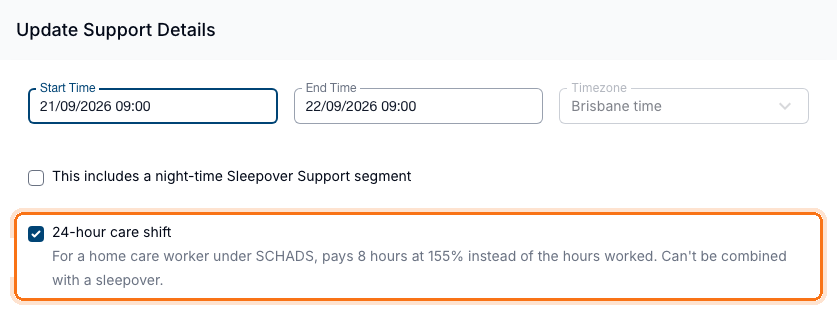
- Only a 1:1 support can be marked. Group supports can't.
- A 24-hour care shift can't also be a sleepover (clause 25.7(a)). Ticking one clears the other.
- Changing the times so the support no longer runs for 24 hours clears the tick.
- In a repeating support, every occurrence runs to the same clock time the next day.
- Once a shift from the support is in a timesheet batch, the setting can't be changed.
- The support's details show 24-hour Care Shift as Yes.
How 24-hour Care Is Paid
The 24-hour period starts at the approved start and ends 24 hours later, or at the same clock time the next day if that is later.
| Situation | Paid as |
|---|---|
| Home care worker, approved within the 24-hour period | 8 hours at the 24-hour care rate, even when approved for less |
| Approved time past the 24-hour period, such as a late relief | Hours worked, at the rate for when that time falls. A public holiday is checked on the extra time's own dates. Never topped up to a minimum engagement |
| Worker not on a home care classification | Hours worked, like any other shift |
The 8 hours sit outside the ordinary-hours caps, so they never start overtime, and they are never part of a broken shift. A separate short shift before or after keeps its own minimum engagement. The 8 hours count towards a part-time or casual first aid allowance.
The Award Interpretation tab and the Award Pay Report show the 8 hours in a 24-hour care column. The Award Playground can't mark a record as 24-hour care, so it interprets a loaded 24-hour care shift as hours worked.
Alerts for 24-hour Care
- A home care worker on a 24-hour care shift raises no Exceeds Maximum Hours or Exceeds Ordinary Hours alert.
- Back-to-back 24-hour care shifts still raise Minimum Break: clause 25.4(a) requires a 10-hour break between shifts and clause 25.8 makes no exception. The alert does not change pay. With the Fatigue Management category set to Prevent Selection, the same worker can't be assigned the next back-to-back shift (see Alert Categories).
Exporting 24-hour Care
- Xero: map the optional 24-hour Care pay item on the SCHADS pay group (see Setting up Xero pay items). The export sends the 8 hours to it. The row appears once you have, or have had, a worker on a home care classification.
- Employment Hero: map the 24-hour Care work type (see Employment Hero pay item mapping).
See Timesheet Batches for when validation asks for these mappings.
SCHADS Overtime Stream
Each SCHADS contract has a SCHADS Overtime Stream, set on the worker's employment details. It decides three rules:
| Rule | Disability services & home care | Social, community & crisis accommodation |
|---|---|---|
| First Mon-Sat overtime band | 2 hours | 3 hours for full-time employees, 2 hours for part-time and casual |
| Minimum engagement for part-time and casual employees | 2 hours | 3 hours |
| Broken shifts | Apply | Do not apply |
On the Social, community & crisis accommodation stream Astalty does not pay the Broken Shift Allowance or double time beyond a 12-hour span, keeps the night loading on an early-morning leg, and raises no broken shift alerts. Shifts separated by a break each need 3 hours on their own: the break does not count towards the minimum engagement. With Pay Award Minimum Engagement turned on, a part-time or casual worker rostered 9am-10am then 10:15am-3pm is paid 7.75 hours: the first shift is topped up from 1 hour to 3, plus 4.75 hours.
Home care employees belong on Disability services & home care, whose three rules all match the Award for them. A contract with a home care classification is locked to it.
New contracts default to Disability services & home care. To review or change it, open the worker's HR tab and edit their contract - see Staff Contracted Hours.
Allowances
- First aid allowance - for workers with the entitlement on their contract. Full-time quantities are 38 hours per week of the period when eligible work exists; part-time and casual quantities use eligible hours capped at 38 per week. You can exclude cancelled shifts and/or provider travel - see First Aid Allowance in Scheduling Settings.
- Broken shift allowances - added automatically, as above.
- Sleepover allowance - per night, as above.
- Kilometre / vehicle allowance - per kilometre, for approved travel in a worker's own vehicle.
- Laundry allowance, uniform allowance and the overtime meal allowance - see the sections below.
Astalty uses allowance rates loaded for the pay period. It does not retrieve changes live from Fair Work or update rates in Xero. Check both systems after a rate change; see Maintaining Award Rates.
The on-call allowance, clothing reimbursements, recall meal allowance, telephone and heat allowances, and board-and-lodging arrangements are not calculated - see What Astalty covers under this award.
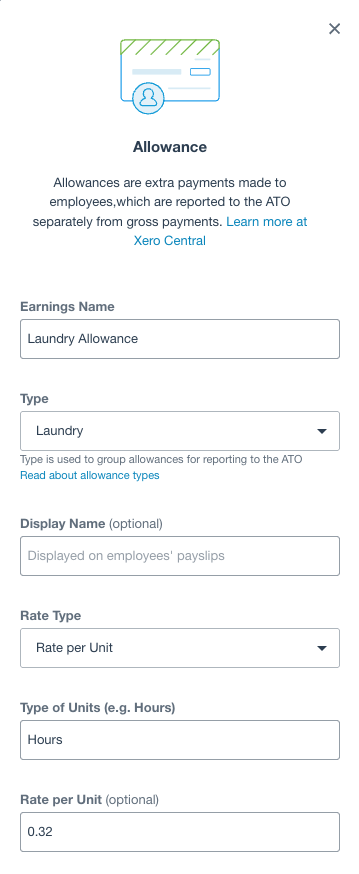
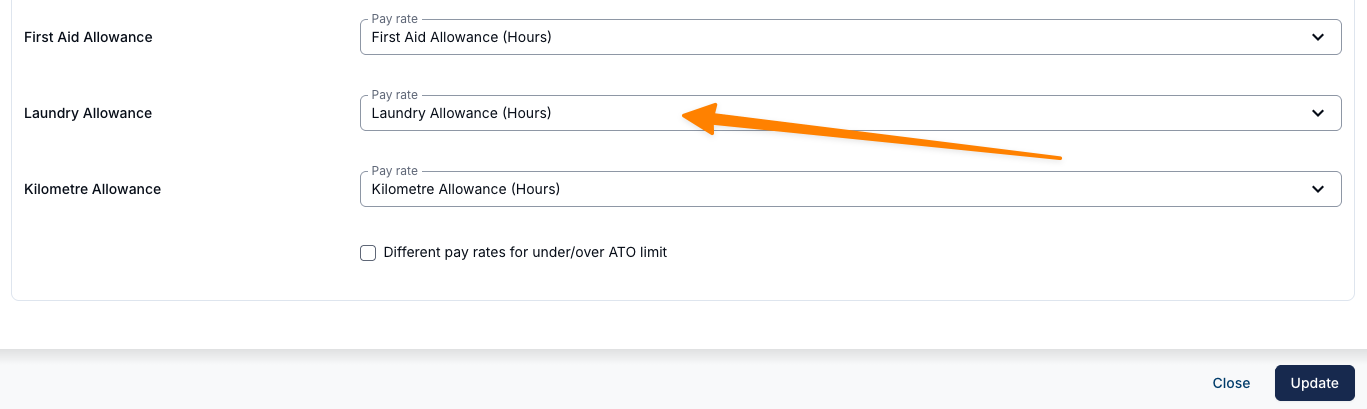
Laundry Allowance
Laundry allowance is supported as a SCHADS award entitlement. When laundry allowance is enabled on an employee's contract, the system automatically calculates the per-shift amount, applies the weekly cap, and includes it in payroll outputs. Both amounts come from the rate schedule loaded for the pay period; check published changes before payroll.
Uniform Allowance
The uniform allowance works the same way. It's paid when the employer requires a uniform but, by agreement, pays an allowance instead of supplying one. When it's enabled on an employee's contract, Astalty calculates the per-shift amount, applies the weekly cap (whichever is the lesser), and includes it in payroll outputs - the per-shift rate and weekly cap come from the loaded rate schedule. Map its pay item on the pay group to include it in the Xero export.
For providers using the Xero integration, the laundry allowance pay item mapping is optional - and only needs to be set up for employees who are entitled to receive the allowance.
Meal Allowance
Astalty can automatically add a SCHADS overtime meal allowance to a worker's timesheet when they work a long enough shift. The same setting also drives the meal allowance for the Nurses, Aged Care and Health Professionals awards.
How the allowance is calculated:
- Astalty looks at each worker's overtime per shift (the hours beyond their ordinary-hours cap for that day).
- One meal allowance is added once that overtime is more than one hour.
- A second meal allowance is added once that overtime goes beyond four hours.
- Under the rules for pay periods starting on or after 1 June 2026, back-to-back work, including work either side of a recorded unpaid meal break, shares each meal threshold across midnight. Each threshold is paid once for the continuous shift.
- SCHADS sends one Meal Allowance line with one or two units. It does not use the separate Meal Allowance (Second) item used by the other three awards.
- Review meal provision and notice conditions separately; the automatic setting uses overtime thresholds, not a per-shift assessment of those conditions.
To turn automatic meal allowances on:
- Go to Settings > Scheduling.
- In the Payroll & Awards section, find Meal Allowance under Allowances.
- Choose Create automatically for overtime to switch it on (choose Don't create meal allowances to keep it off).
- Save your scheduling settings.

For providers using the Xero integration, the meal allowance pay item mapping is optional - you only need to map a Meal Allowance pay item if you have turned the automatic allowance on.
Scheduling alerts
Astalty raises alerts while you roster, before the hours reach payroll:
- Minimum engagement: 2 hours for part-time and casual employees, or 3 hours on the Social, community & crisis accommodation stream
- Minimum 10-hour break between shifts (8 hours by agreement next to a sleepover - record it in the Minimum Break Near a Sleepover contract field)
- Broken shift span and shift portions, except on the Social, community & crisis accommodation stream
- Sleepover span and sleepover-adjacent work
- Shift duration / per-shift cap reached
- Fatigue management
See Scheduling Award Alerts for the full list and how alert behaviour is configured.
Where you see the interpretation
- Award Interpretation tab on a timesheet batch - the per-worker breakdown for the shifts in that batch.
- Award Pay Report - the same breakdown across a full pay period.
- Award Playground (under Scheduling > Award Playground) - experiment with hypothetical work records before running real timesheets.
- Interpreted Excel exports and the Xero timesheet push use the pay categories and allowances described here. Other payroll exports can contain raw timesheet records; see payroll platform differences.
Each worker's expanded view includes the interpretation trace showing which SCHADS rules were applied - which cap was reached, which overtime band was used, and when a broken-shift or sleepover allowance was added.
Award Playground
Providers can experiment with different shift scenarios - including sleepovers, active overnight periods, broken shifts and cross-midnight shifts - before processing real timesheets. The playground interprets under the award on the selected worker's contract, so for a SCHADS worker it applies the SCHADS rules described on this page.
See the Award Playground guide for how to build scenarios, use templates, pre-load an existing schedule, and set up sleepover scenarios.
Setting up Xero pay items
Pay items are mapped per pay group, and one pay group's mapping can only encode one award's rates. If you also run staff on other awards, each award needs its own pay group.
Whilst we cannot provide payroll advice based on your interpretation and application of the Social, Community, Home Care and Disability Services Industry Award 2010, these are the Pay Items and their suggested multipliers when setting up Xero pay items for a SCHADS pay group. You should refer to the Award, or seek professional and qualified advice, to ensure accuracy and compliance for your organisation.
| Pay Item | Full-time / Part-time (Multiplier) | Casual (Multiplier) | Notes |
|---|---|---|---|
| Weekday Daytime | 1 | 1.25 | Also known as 'Standard' |
| Afternoon | 1.125 | 1.375 | Whole weekday shift loading; see Shift loadings above |
| Night | 1.15 | 1.4 | Whole weekday shift loading; see Shift loadings above |
| Saturday | 1.5 | 1.75 | Casual = loading added on top (1.5 + 0.25) |
| Sunday | 2 | 2.25 | Casual = loading added on top (2 + 0.25) |
| Public Holiday | 2.5 | 2.75 | Casual = loading added on top (2.5 + 0.25) |
| Overtime 1st Period | 1.5 | 1.75 | First band, Mon-Sat. Casual = loading added on top |
| Overtime Last Period | 2 | 2.25 | After the first band, Mon-Sat. Casual = loading added on top |
| 24-hour Care | 1.55 | 1.8 | Optional. 8 hours per 24-hour care shift, home care workers only |
| Sleepover Allowance | Per-night allowance | ||
| Broken Shift One Unpaid Break | Per broken shift | ||
| Broken Shift Two Unpaid Break | Per broken shift | ||
| First Aid Allowance | Only for workers with the first aid entitlement | ||
| Kilometre Allowance | Per-km | ||
| Laundry Allowance | Only for workers with the laundry entitlement | ||
| Uniform Allowance | Only for workers with the uniform entitlement | ||
| Meal Allowance | One or two units of this item when automatic meal allowances are on; SCHADS does not use Meal Allowance (Second) | ||
| All Casual multiplier rates are inclusive of the casual loading. |
Under SCHADS the Overtime Sunday and Overtime Public Holiday pay items are optional - the rates match the ordinary Sunday and Public Holiday items, which are used as the fallback. (Under the other awards they differ and must be mapped.)
For the mapping workflow itself, see Setup Pay Items and Employee Templates in Xero and Setup Pay Groups and Employees in Astalty.
If you pay day workers or under an EBA
Everything on this page describes how Astalty interprets the SCHADS Award for shift-workers. Two common situations sit outside that:
- Day workers. The interpreter applies shift-worker loadings and weekend or public holiday rates - and there is no setting that marks a worker as a day worker. Because a day worker's ordinary hours run 6:00am to 8:00pm Monday to Sunday, the loadings Astalty applies won't match their entitlements.
- Enterprise agreements (EBAs). A worker's employment contract has to carry one of the four awards Astalty interprets - SCHADS, Nurses, Aged Care or Health Professionals. There is no enterprise agreement option, so an agreement that varies rates, spans or overtime can't be represented.
In both cases the issue is the same: Astalty's interpretation doesn't describe how your people are actually paid. Whether that becomes a payroll problem depends on your payroll platform.
Your payroll platform decides who interprets the hours
The Platform setting under Settings > Scheduling > Payroll & Awards controls what Astalty sends to payroll:
| Platform | What Astalty sends | What decides the pay |
|---|---|---|
| Xero | Interpreted pay lines - hours already split into ordinary, afternoon, night, weekend, public holiday and overtime pay items | Astalty's interpretation for the worker's contract award; Xero supplies the mapped rates |
| Employment Hero, PayCat, QuickBooks Payroll | Raw timesheet lines - start and end times, paid breaks, travel, and sleepover work types | Your payroll platform's own award or agreement rules |
On Xero, Astalty chooses the pay categories and quantities, while Xero supplies the rates from the mapped pay items and employee template. Check both before posting the pay run.
On Employment Hero, Astalty sends the hours as they were worked and doesn't classify them. Ordinary work goes across under a single ordinary hours work type whether it fell on a Tuesday morning, a Saturday or a public holiday. Your payroll platform decides the penalty, overtime and loading treatment from the times, using the award or agreement configured there.
What's different when you're not on Xero
- Send to Employment Hero - pushing timesheets straight across from Astalty - needs the Employment Hero integration, included with the Premium plan. Export Employment Hero Timesheet (CSV) needs only Scheduling and the platform setting, so you can upload the file yourself without it.
- You still map pay items, but each Astalty pay item is mapped to an Employment Hero work type rather than a Xero pay item. See Pay item mapping.
Astalty does not provide payroll, taxation or employment advice. Check your obligations against the Award or your agreement, or seek qualified advice.
Frequently asked questions
Why didn't overtime apply when a worker did a long or overnight shift?
Astalty converts hours above the SCHADS ordinary-hours caps into overtime - 10 hours of ordinary time per day/shift (or the worker's agreed cap), and 38 hours per week (or 76 per fortnight) across the pay period. These caps create overtime, as do the separate broken-shift span and active sleepover rules. Award reports, timesheet exports, and timesheet-batch interpretation carry adjoining earlier-period work into the later shift, daily, overtime-band, meal, and minimum-engagement calculations without paying the earlier hours again.
For pay periods starting on or after 1 June 2026, work that continues across midnight is treated as one continuous shift, not two separate days. So a 3pm-11pm shift that continues 11pm-7am is a single 16-hour shift - 10 hours ordinary and 6 hours overtime - not two short days that each stay under the cap. Earlier pay periods apply the cap to each calendar day, so that double stays under the daily cap on both days. If a result looks wrong, check the interpretation trace or reproduce it in the Award Playground.
Does the break between shifts affect overtime?
An insufficient rest break does not by itself create overtime in Astalty. The Minimum Break alert is a rostering check and does not change pay. A gap can, however, separate work for the continuous-shift cap, which applies to pay periods starting on or after 1 June 2026. A recorded unpaid meal break of 30-60 minutes and a sleepover keep the shift together; any other gap starts a new shift. See Ordinary hours and overtime. The Award's separate rest-after-overtime entitlement may also require a manual payroll adjustment.
We rostered less than a 10-hour break between shifts - does Astalty pay a penalty?
No. Under the Award the rest break between two ordinary shifts is an entitlement: the minimum is 10 hours, reducible to 8 hours by agreement where a shift directly precedes or follows a sleepover. The Award attaches no pay penalty to a short break, so Astalty flags it as a rostering issue to fix rather than adding anything to pay.
Record a worker's agreed 8-hour sleepover-adjacent break in the Minimum Break Near a Sleepover field - see Staff Contracted Hours. Choosing 8 hours - By agreement stops a compliant 8-hour break next to a sleepover raising a false alert; a break between ordinary shifts always requires the full 10 hours.
We rostered two back-to-back shifts (a "double") - why is there an Overtime alert but no Minimum Break alert?
SCHADS groups back-to-back work for its continuous-shift ordinary cap. The rest checker separately skips pairs whose shifts start on the same local date; a pair starting on different dates can still raise a Minimum Break alert. A preferred worker suggestion reflects Participant preferences, not award compliance. Check the Minimum Break limitations, continuous hours and subsequent rest.
Does a sleepover count as the rest break between shifts?
Not since the 1 June 2026 changes. A sleepover is no longer treated as rest, so the break is measured from when the sleepover ends. For example, a sleepover finishing at 6am with the next shift starting at 3pm is a 9-hour break, not a full overnight rest. See SCHADS Award changes from 1 June 2026.
Why did a broken-shift allowance apply when there was only a small gap between clients?
This is the most common surprise. A broken shift is any day where a worker has two or three separate work periods split by an unpaid gap. By default, that gap only has to put the next period more than 2 hours after the earlier one began (or after it ends, if that's later) - so a worker who does one support, has that kind of gap, then does another support on the same day is on a broken shift, and Astalty adds the allowance automatically. See Broken shifts for when a short first shift instead absorbs the gap into one engagement.
If you want a different cutoff, a provider-level Broken Shift Minimum Gap setting is available under Settings > Scheduling: gaps of up to the number of minutes you set are treated as continuous work, and only a longer gap forms a broken shift.
A worker on the Social, community & crisis accommodation stream never has broken shifts, so the allowance is never added for them (see Broken shifts).
When does Astalty add an overtime meal allowance, and how do I turn it on?
Only when you switch it on. Astalty can automatically add a SCHADS overtime meal allowance to a worker's timesheet when they work more than one hour of overtime on a shift, plus a second allowance once that overtime passes four hours. It is off by default - turn it on under Settings > Scheduling > Meal Allowance if you pay this allowance, or leave it off if you provide meals to workers on site. Full detail, including the Xero pay item mapping, is in Meal Allowance.
How do I enter a sleepover in Astalty?
Use a Sleepover Window to keep evening, sleepover and morning work in one support, or roster those parts as separate supports. Record disturbances as active overnight periods. The pay calculation still distinguishes active work from the passive sleepover.
What changed for sleepovers on 1 June 2026?
Three things, applied automatically to pay periods starting on or after 1 June 2026: a sleepover no longer counts as a rest break; work before and after a sleepover is treated as one continuous shift; and, by agreement, that combined shift can have an ordinary-hours cap of up to 12 hours. Full detail is in SCHADS Award changes from 1 June 2026.
What is a worker paid if they're woken to work during a sleepover?
The sleepover allowance covers the passive sleepover. Active work performed when the worker is woken is paid separately at the overtime rate, with a minimum of 1 hour. The Award also requires at least 4 hours of active work to be rostered or paid on at least one side of the sleepover.
Does Astalty automatically update when the SCHADS Award changes?
Astalty applies implemented rule changes using their effective dates, including the 1 June 2026 sleepover changes. A published Award variation is not automatically imported. Review new rates and conditions against this guide and your payroll setup.
Who updates pay rates after the Annual Wage Review?
You maintain payroll rates and check the rate stored on each Astalty contract. See Maintaining Award Rates, including the temporary vehicle allowance below.
Can Astalty tell me if my roster is SCHADS-compliant, or give payroll advice?
Astalty gives you the tools to interpret and check rosters - the interpreter, the per-shift interpretation trace, the award alerts and the Playground - but it cannot give payroll advice or confirm compliance for your organisation. How the Award applies to your situation is your decision; refer to the Award or seek qualified advice.
How can I see why a shift was paid a certain way?
When shifts are timesheet-batched, Astalty records the Award rules it applied to each worker's shifts - for example when a daily or period cap was reached, which overtime band was used, and when a broken-shift or sleepover allowance was added. You can also reproduce any scenario in the Award Playground before running real timesheets.
What Astalty covers under this award
| Area | Rule / behaviour | Supported? |
|---|---|---|
| Classification - ordinary & penalties | Whole weekday shift loadings, including adjoining paid travel | Yes |
| Saturday, Sunday and public holiday rates | Yes | |
| Broken-shift night downgrade (early-morning leg on a broken-shift day has no night loading) | Yes | |
| Ordinary hours caps & overtime | Daily cap, and a continuous-shift cap joined across a recorded unpaid meal break (pay periods from 1 June 2026); 12 hours only for qualifying sleepover shifts | Yes |
| Weekly / fortnightly ordinary caps (38h / 76h) | Yes | |
| Mon-Sat overtime banding, including the 3-hour first band for full-time Social, Community & Crisis Accommodation employees | Yes | |
| First overtime band carried across midnight within a continuous shift (pay periods from 1 June 2026) | Yes | |
| Sunday overtime and public holiday overtime rates | Yes | |
| Overtime purely because a full-time worker exceeded their rostered hours while under the caps | No | |
| Broken shifts (not on the Social, community & crisis accommodation stream) | Detect broken shifts and pay the 1-break and 2-break allowances | Yes |
| Double time for work beyond the 12-hour span | Yes | |
| Provider-level minimum gap setting for short unpaid gaps | Yes | |
| Sleepovers | Sleepover allowance per night, with the passive span excluded from hours | Yes |
| Minimum 1 hour's pay per sleepover, across all disturbances that night | Yes | |
| 4 hours of work beside a sleepover and the 8-hour sleepover span (alerts) | Yes | |
| Automatic four-hour payment beside a sleepover | No | |
| 1 June 2026 rules - sleepover not a rest break, combined shift, 12-hour agreed cap | Yes | |
| Excursion / camp specific pay rules | No | |
| 24-hour care (home care employees) | 8 hours at 155% (180% for casuals) per 24-hour period, with time past the period paid as worked | Yes |
| Care beyond 8 hours in the period, paid as overtime (clause 25.8(e)) | No | |
| On-call & recall | On-call allowance, recall to work and remote work minimum payments | No |
Coverage Summary: Allowances and Other Rules
| Area | Rule / behaviour | Supported? |
|---|---|---|
| Allowances | First aid allowance | Yes |
| Laundry allowance (per shift, capped weekly) | Yes | |
| Kilometre / vehicle allowance | Yes | |
| Overtime meal allowance (off by default) | Yes | |
| Allowance values selected from loaded rate schedules | Yes, subject to the rate limitations above | |
| Uniform allowance (per shift, capped weekly) | Yes | |
| Clothing reimbursements | No | |
| Telephone, heat, and board & lodging | No | |
| Breaks & rest periods | Minimum engagement for part-time and casual employees: 2 hours, or 3 hours on the Social, community & crisis accommodation stream (alert) | Yes |
| Short engagements paid up to the minimum engagement (off by default) | Yes | |
| Minimum 10-hour break between shifts, 8 hours by agreement next to a sleepover (alert) | Yes | |
| Meal break rules (work through a meal > overtime until the break is taken) | No | |
| Double time until a 10-hour break after overtime (must be handled manually) | No | |
| TOIL & leave | Time-off-in-lieu (TOIL), extra leave and leave loading for shiftworkers | No |
| Classification & higher duties | Social and community services, home care disability and home care aged care classifications, at current award rates | Yes |
| Crisis accommodation and family day care classifications | No | |
| Costing one worker's hours at more than one classification | No | |
| Automatic higher-duties pay, or determining a worker's classification level | No | |
| Other | Day worker rules (the interpretation is based on shift-workers) - see If you pay day workers or under an EBA | No |
| Enterprise agreements (EBAs) - contracts carry a modern award, not an agreement | No | |
| On-screen rule traces explaining which award logic applied | Yes |
Sources and Review
This page was checked against Astalty's SCHADS interpreter, scheduling alert adapters, rate profiles, and automated tests at the source revision recorded for this guide audit. The supported-rules table describes implemented product behaviour. It is not a legal review or a compliance assessment. Check the current SCHADS Award, the worker's arrangements, and Maintaining Award Rates before payroll.