- Administration
- Settings
- Documents
Documents
The Documents settings page is where you create and manage Document Categories - the labels used to organise documents across Astalty. You'll find it under Settings → Documents.
Categories aren't limited to Participants - the same set of categories is available anywhere you attach a document in Astalty, including Participants, Contacts, Organisations, and Plan Managers. Setting up a clear, consistent set of categories makes documents far easier to find and filter later.
Before You Start
By default, only Admins can edit, archive or restore Document Categories. Managers and Team Members can view and add them.
Document Categories
Before you add a document to a Participant's profile, you may wish to add the different document categories based on your organisation's needs.
For example, you may wish to add a category entitled "Service Agreements" to categorise all the Service Agreements related to that Participant.
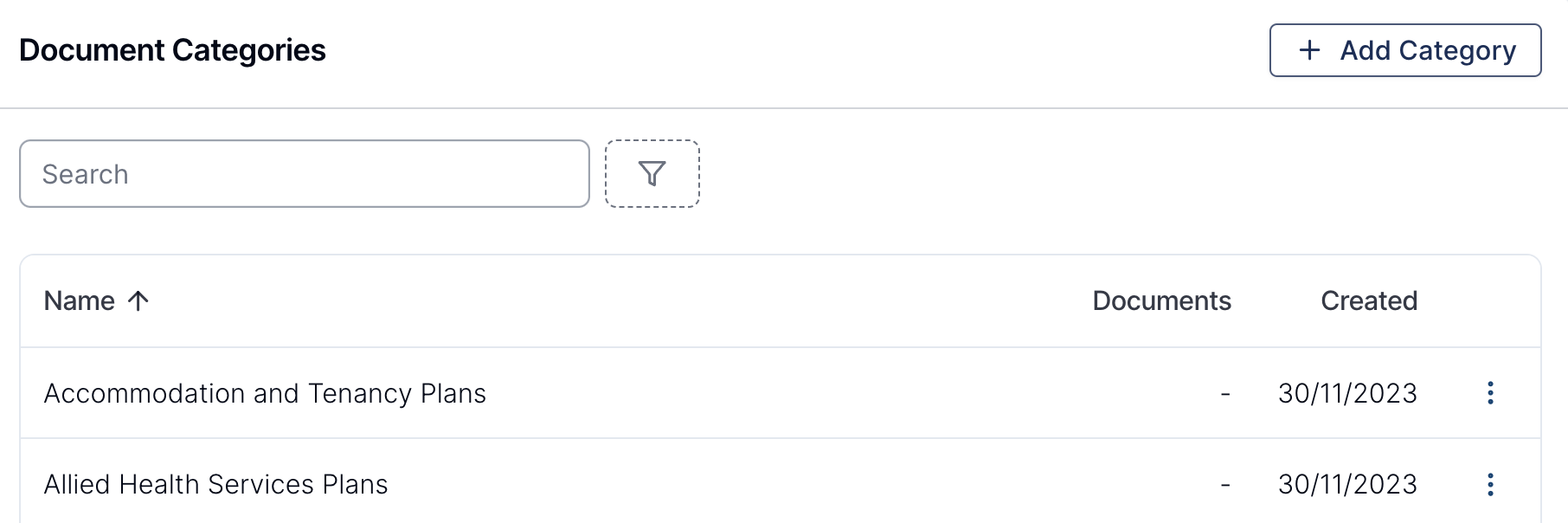
Viewing Your Document Categories
The Documents settings page lists all of your categories in a table with the following columns:
- Name - the name of the category. Archived categories are marked with an Archived label next to their name.
- Documents - how many documents are currently assigned to the category. Categories with no documents show a dash (
-). - Created - the date the category was created.
You can sort the table by Name or Created by clicking the column heading.
Searching and Filtering
- Use the search field at the top of the table to find a category by name.
- Use the Status filter to narrow the list:
- Active - categories currently in use.
- Archived - categories that have been archived.
- Not used - categories that don't have any documents assigned to them. This is handy for finding categories you can tidy up.
Adding a Document Category
- From the left-hand menu, select Settings, then select Documents.
- Click Add Category.
- Enter a Name for the category.
- Click Create.
Editing a Document Category
To rename an existing category:
- On the Documents settings page, find the category and select the three-dot menu on its row.
- Select Edit.
- Update the Name.
- Click Update.
Archiving a Document Category
If a category is no longer needed, you can archive it rather than leaving it in your active list.
- Open the category using the three-dot menu and Edit.
- Select Archive, then confirm.
Archived categories are hidden from the active list. To see them again, set the Status filter to Archived.
Restoring an Archived Category
- Set the Status filter to Archived.
- Open the archived category and select Restore.
The category will return to your active Document Categories list.
Merging Document Categories
If you end up with duplicate categories, you can merge them together - all documents are moved into the category you keep and the duplicate is archived.
See Merging Document Categories.
Using Document Categories
To learn how to apply categories to documents on a Participant's profile, see the Documents guide.