Shifts Export
Overview
The Shifts Export provides a CSV or print-friendly PDF of Support Worker shifts, filtered by date range. Use it to analyse scheduling patterns and coverage or print a roster for the selected period.
Accessing the Shifts Export
- From the left-hand side menu, click Exports.
- Select the Shifts category.
- Select Shifts.
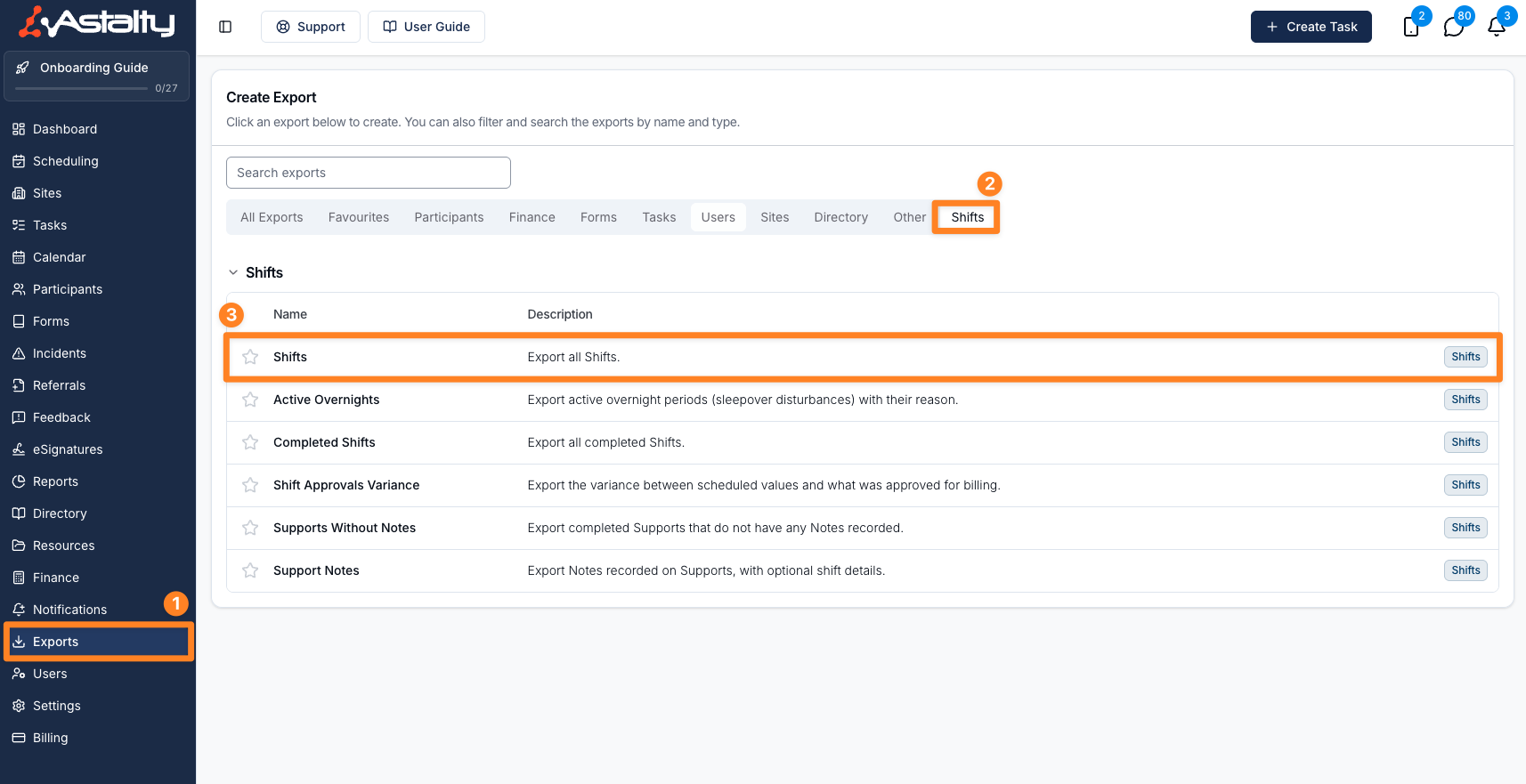
Configure the Export
Before selecting Create Export, use the available options to configure the export.
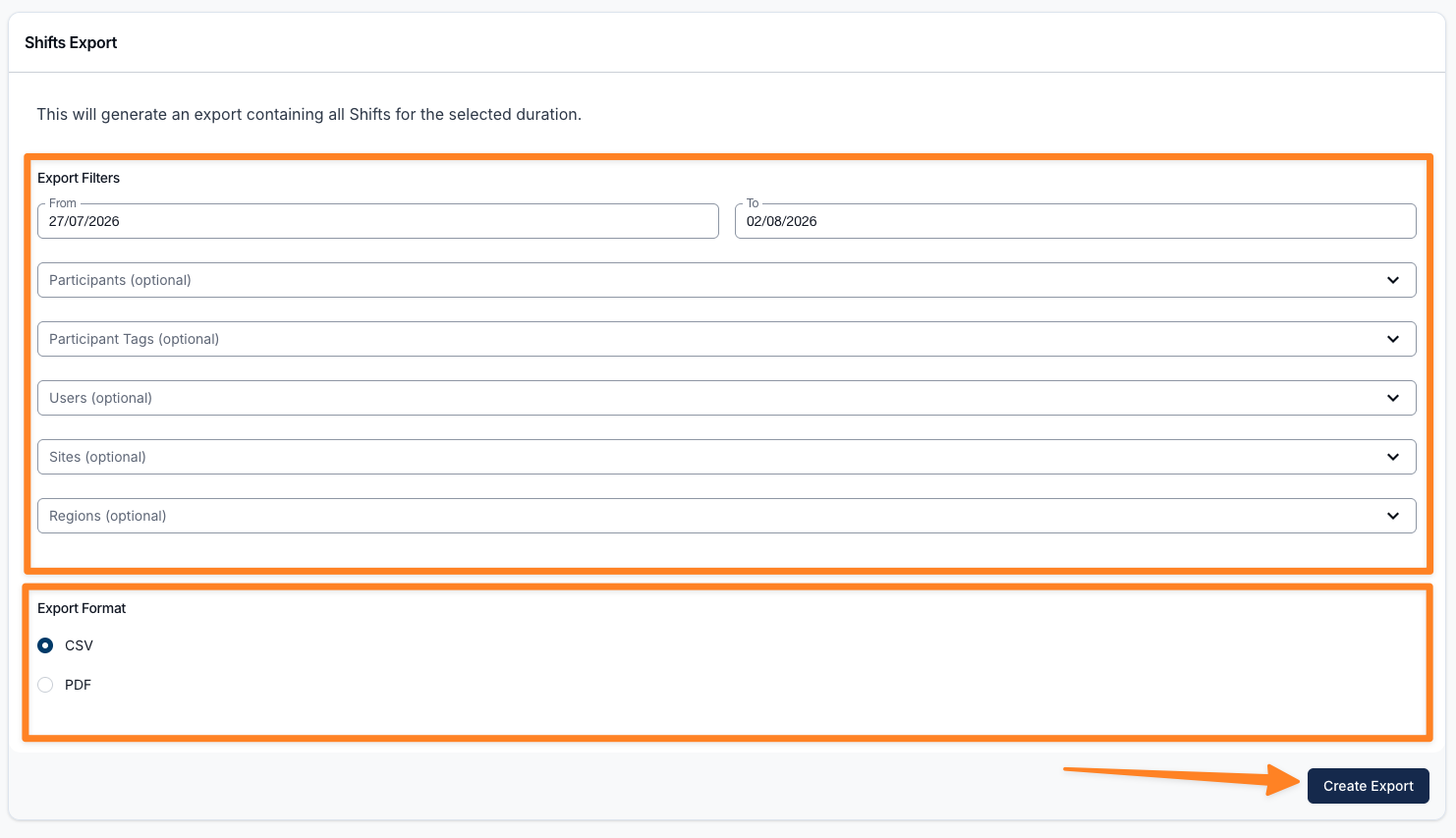
Set the Date Range
This will generate an export containing shifts whose Start Time falls in the selected date range. The whole To date is included. You can also use the This week, Last week, Last month, and Last quarter shortcuts to set the range quickly.
Participants
This field is optional. If left blank, the Export will include Shifts for all Participants within the selected date range, subject to the Users selection. You may select one or multiple Participants to limit the results to specific individuals.
Participant Tags
This field is optional. Select one or more Participant Tags to include all Participants who have any of the selected tags. You can combine tags with individually selected Participants - the export covers everyone matched by either selection, with no duplicates. If left blank, the export uses your Participant selection (or all Participants if none are selected).
Users
This field is also optional and allows you to further refine the Export based on the Users involved in the Shifts. If left blank, the Export will include Shifts for all Users within the selected date range, subject to the Participant selection.
Sites
This field is optional. Select one or more Sites to limit the export to Shifts at those Sites. If left blank, the export is not restricted by Site.
Regions
This field is optional. Select one or more Regions to limit the export to Shifts in those Regions. If left blank, the export is not restricted by Region. This field only appears when Regions are enabled.
A Shift counts as being in a Region if its assigned worker, its Site, or its Participant is in that Region. Because a Shift's Region comes from those three sources rather than a tag of its own, this export has no Unassigned option.
Choose the Export Format
Under Export Format, choose whether to generate the export as a CSV spreadsheet or a PDF document. CSV is selected by default.
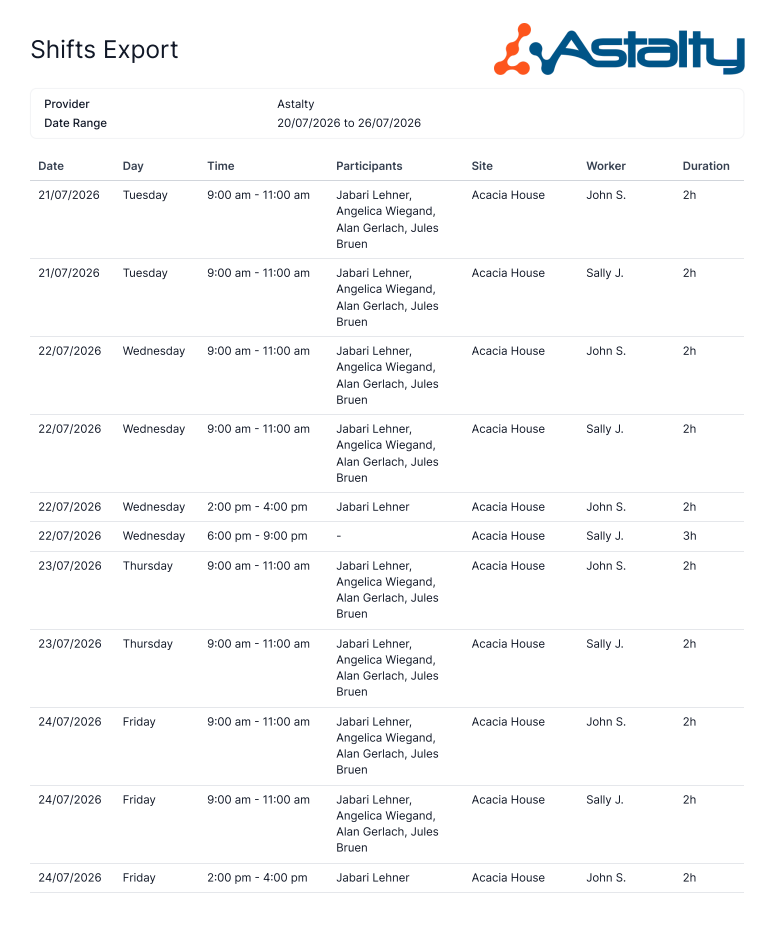
The PDF is a print-friendly shift schedule that lists each shift's date, day, time, duration, Participants, site, and worker - handy for sharing or printing a roster.
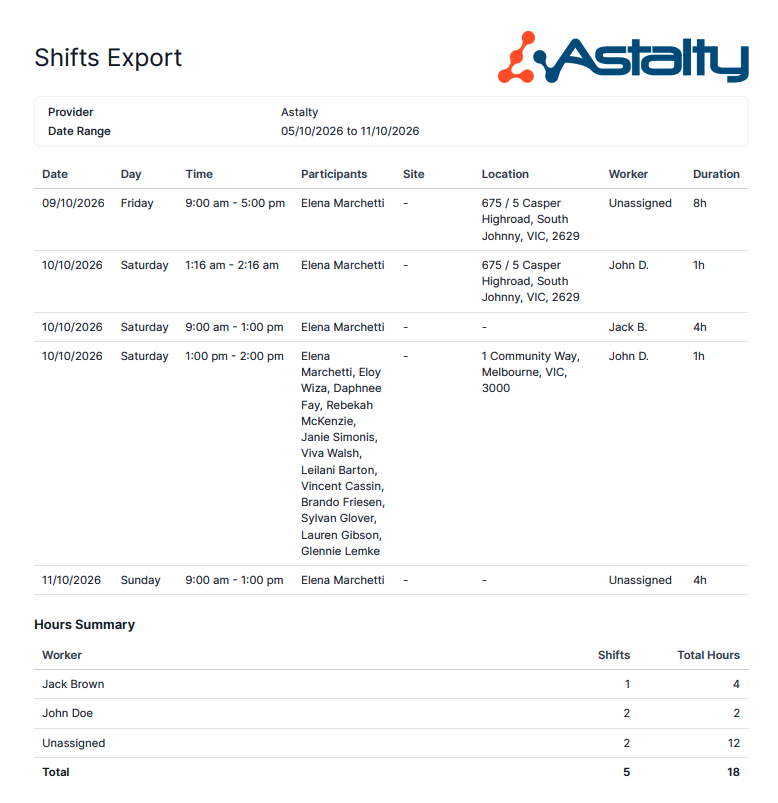
The PDF ends with an Hours Summary: each worker's shift count and total scheduled hours for the date range, plus a Total row. Workers are listed by their full name - unlike the schedule above, which abbreviates it to a first name and last initial - sorted alphabetically with Unassigned last. Total Hours sums each worker's shift durations and is shown to two decimal places, with trailing zeros dropped (for example 8, 12.5, 3.33).
Include Charges
When you select CSV and have Finance access, the Include charges option appears. Turn it on to list each charge from a shift on its own row. A shift with several charges produces several rows; a shift with no charges still produces one row with blank charge columns.
The added columns are Charge Participant, Charge Item Number, Charge Item Name, Charge Ratio, Quantity, Unit, Unit Cost, and Total Cost.
Generating the Export
Click on the Create Export button.
Downloading the Export
When the export is ready it will appear on the Exports page where you can click on Download to save it to your device.
Exported Fields
The export displays key details for each shift, including:
- Support Worker - The worker assigned to the shift. Shifts with no worker assigned show Unassigned instead of a blank cell.
- Participants
- Site - The Site the shift is assigned to. Blank when the shift has no Site.
- Location - The address where the support takes place, matching the Location shown on the support's details. Only Support Shifts and Group Support Shifts have a Location, so this is blank for Internal Shifts and Unpaid Breaks.
- Shift Type - Distinguishes each shift as a Support Shift, Group Support Shift, Internal Shift, or Unpaid Break.
- Status - Whether the shift is Published or Unpublished, so you can tell published shifts apart from unpublished drafts.
- Day - The day of the week the shift starts, as a full day name (Monday through Sunday). Handy for grouping or filtering by day without having to derive it from the date.
- Start Time - The shift's start, formatted as
dd/mm/yyyy hh:mm, so this column carries the date as well as the time. - End Time
- Clock In Time
- Clock Out Time
- Timezone - The shift's timezone, shown as the city name (for example Sydney or Perth). This column only appears when Multi-Timezone Scheduling is enabled.
- Shift Duration - Displayed as minutes
- Approved Duration - The time between the shift's approved start and end times, also displayed as minutes. This is only populated once the shift has approved start and end times - otherwise it's blank. Comparing it against Shift Duration shows where approved time differs from what was scheduled.
- Cost Code - The cost code assigned to the shift. This column only appears when cost codes are enabled in your scheduling settings.
- Custom Allowances - The names of the shift's custom allowances, separated by commas. This column only appears when your account has shifts with custom allowances and your role can see them.
- Participant Signed Off - If the Participant has signed off on the shift, Yes will be displayed in this column.
- Approved - Yes if the shift has been fully reviewed, otherwise No.
- Recurrence - the shift's recurrence rule, or Does not repeat.
- Group Ratio - the ratio for a fixed-ratio group support. It is blank for other shifts and flexible group supports.