Notifications
Astalty's Notifications page is where you set up automated alerts about upcoming dates, overdue items, new submissions and key milestones across your organisation.
How notifications work
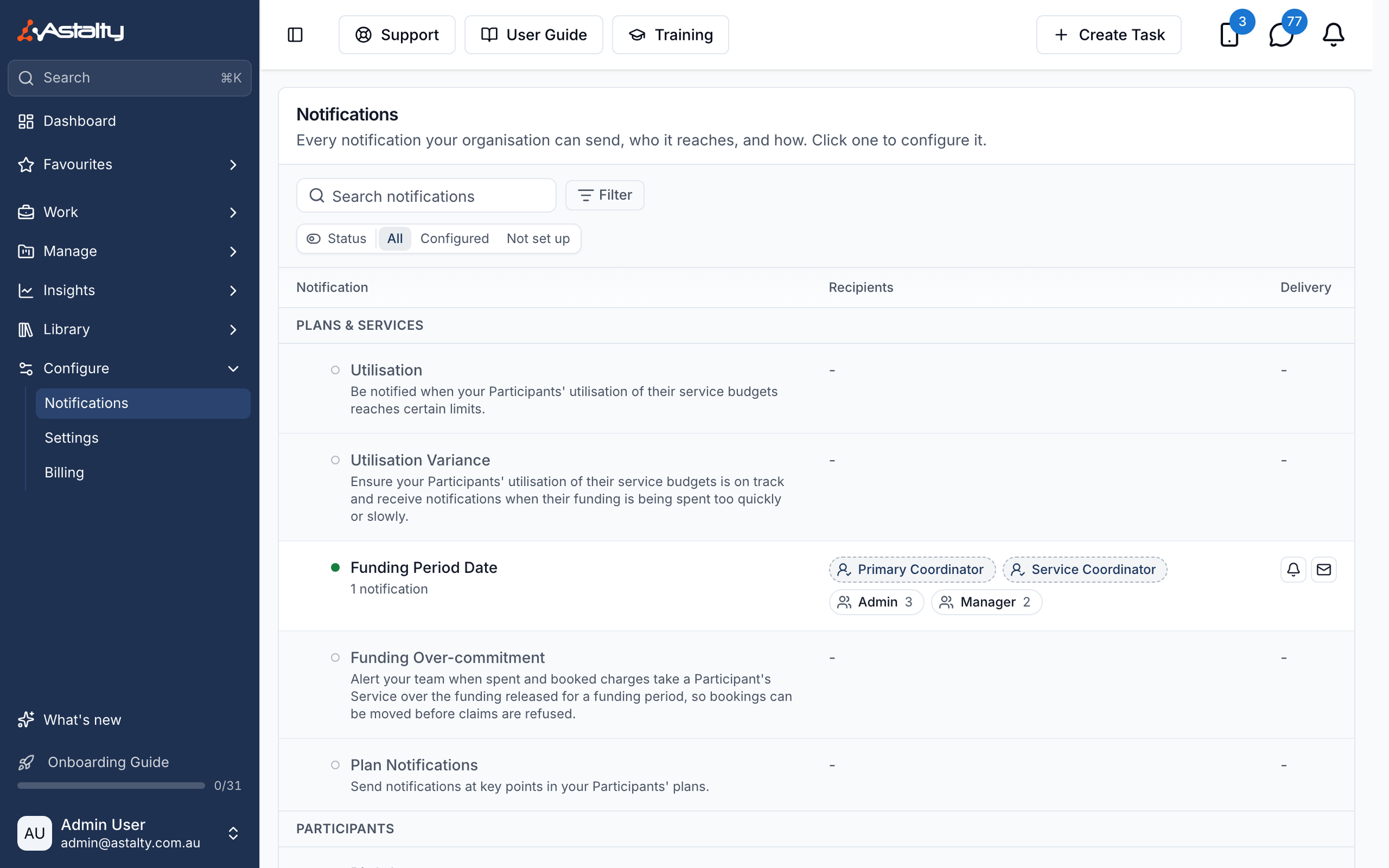
The Notifications page lists every notification type your organisation can send, in groups that match the sections below. Each row shows whether it's set up, who it reaches, and how it's delivered, so you can see at a glance what still needs configuring.
- Type into Search notifications to filter by name.
- Status narrows the list to Configured or Not set up.
- Category narrows it to one group below, and Delivery to Within Astalty or Email.
- A type with more than one rule can be expanded to preview each rule in place. Click a notification, or one of its rules, to open it, then click Create Notification to add a rule.
Each rule sets:
- When it sends - a set time before or after a date, such as a birthday, a record expiry or a plan end, or as soon as something happens, such as an incident being submitted or a shift being clocked out.
- Who receives it - User Groups and individual users, plus the Participant's coordinators or a Site Manager where the type offers them.
- How it is delivered - Within Astalty, Email, or both.
You can add several rules of the same type, for example one a week before a date and another on the day. Use the actions menu on a rule to edit, clone or delete it.
- Date-based notifications are checked once a day, mostly between 8:30am and 9:35am Brisbane time (AEST). Each type's page gives its exact time.
- Incident Deadlines checks hourly for upcoming reporting deadlines.
- Utilisation and Utilisation Variance are checked after charge changes and overnight, at about 4am Brisbane time.
- Event-based notifications, such as a new incident or a clock-out, are sent as the event happens.
- Deactivated users are skipped, and a user who qualifies for a rule more than once gets one notification.
- Two types go to Support Workers as push notifications in the Astalty app instead: Missing Support Notes Reminder and Participant Record Acknowledgement. No notification type is sent by SMS.
Available notification types
The groups below match the groups on the Notifications page. Several types depend on a feature being part of your account, such as Scheduling, Forms or Referrals. Each type's page says what it needs.
Plans & Services
| Notification | Sends when |
|---|---|
| Utilisation | A Participant's spending on a Service reaches a set percentage of the funding released for it. |
| Funding Over-commitment | Spent and booked charges take a Participant's Service over the funding available through a funding period. |
| Utilisation Variance | A Participant's spending runs too fast or too slow against the expected pace. |
| Funding Period Date | Before, on or after the day a funding period starts. |
| Plan Notifications | Before a plan ends, or after a plan starts. |
Participants
| Notification | Sends when |
|---|---|
| Birthdays | On or before a Participant's birthday. |
| Participant Records | Before, on or after a Participant Record expires. |
| Check-ins | Before or on the day a check-in is due, or once it is overdue. |
| Participant Risk Review | Before, on or after the day a risk is due for review. |
| Participant Risk Added | A new risk is added to a Participant. |
| Flagged Notes | A note checker flags a note. Needs Note Flagging, which is included with Astalty Premium. |
| Overdue Note | A support or task still has no note after a set number of days. |
Team
| Notification | Sends when |
|---|---|
| User Records | A staff record is expiring or overdue, or needs verifying. |
| Birthdays | On or before a team member's birthday. |
| Staff Milestones | On or ahead of a work anniversary, or once a milestone since the employment start date passes. |
Sites
Sites are part of Scheduling.
| Notification | Sends when |
|---|---|
| Site Records | Before, on or after a site record expires. |
Forms
This group appears when Forms are part of your plan.
| Notification | Sends when |
|---|---|
| Incidents | An incident form is submitted. |
| Incident Deadlines | A reportable incident's upcoming reporting deadline is within the lead time you choose. |
| Incident Follow Up | An incident has sat in the same status for a set number of days. |
| Referrals | A new referral is received. |
| Referral Follow Up | A referral has sat in the same status for a set number of days. |
| Feedback | A feedback form is submitted. |
Scheduling
This group appears when Scheduling is turned on.
| Notification | Sends when |
|---|---|
| Recurring Shifts Ending Soon | Before recurring shifts, supports or group supports end. |
| Recurring Unavailability Ending Soon | Before a Support Worker's recurring unavailability ends. |
| Unavailability Requests | A Support Worker submits an unavailability request. |
| Missing Support Notes Reminder | Every Monday, a push reminder to each Support Worker with supports missing notes. |
| Incomplete Mandatory Tasks | A shift is clocked out with an incomplete mandatory task, straight away or after a delay. |
| Clock Location Variance | A clock in or out is recorded too far from the Participant's service address. |
| Public Holidays | On or before a public holiday. |
| Lapsed Qualifications | A worker rostered to an upcoming shift no longer holds a required qualification. |
| Participant Record Acknowledgement | A push reminder to Support Workers about Participant records to read before their shifts. |
| Participant Record Acknowledgement Escalation | A Support Worker still hasn't read a Participant's records before an upcoming shift. |
Activities
Activities are part of Scheduling.
| Notification | Sends when |
|---|---|
| Activities Ending Soon | Before a recurring activity reaches its end date. |
Finance
| Notification | Sends when |
|---|---|
| Recurring Charges Ending Soon | Before recurring charges end. |
Overview video
For a walkthrough of the notification setup process, see the Notification Overview Walkthrough.