Shift Approvals Variance Export
Overview
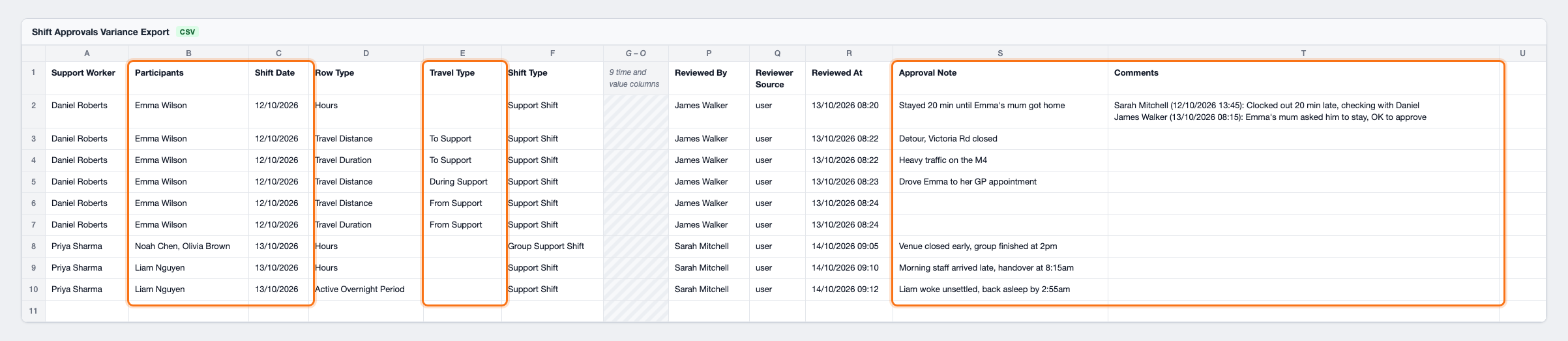
The Shift Approvals Variance Export generates a CSV comparing scheduled values with the values approved for billing, together with who each shift was for, each approval's note, and the comments left on the shift. It covers shift hours, travel distance and duration, and active overnight periods within the selected date range.
Only assigned shifts with approved start and end times are included. The date range is matched against the shift's scheduled start time and includes the whole To date.
Accessing the Shift Approvals Variance Export
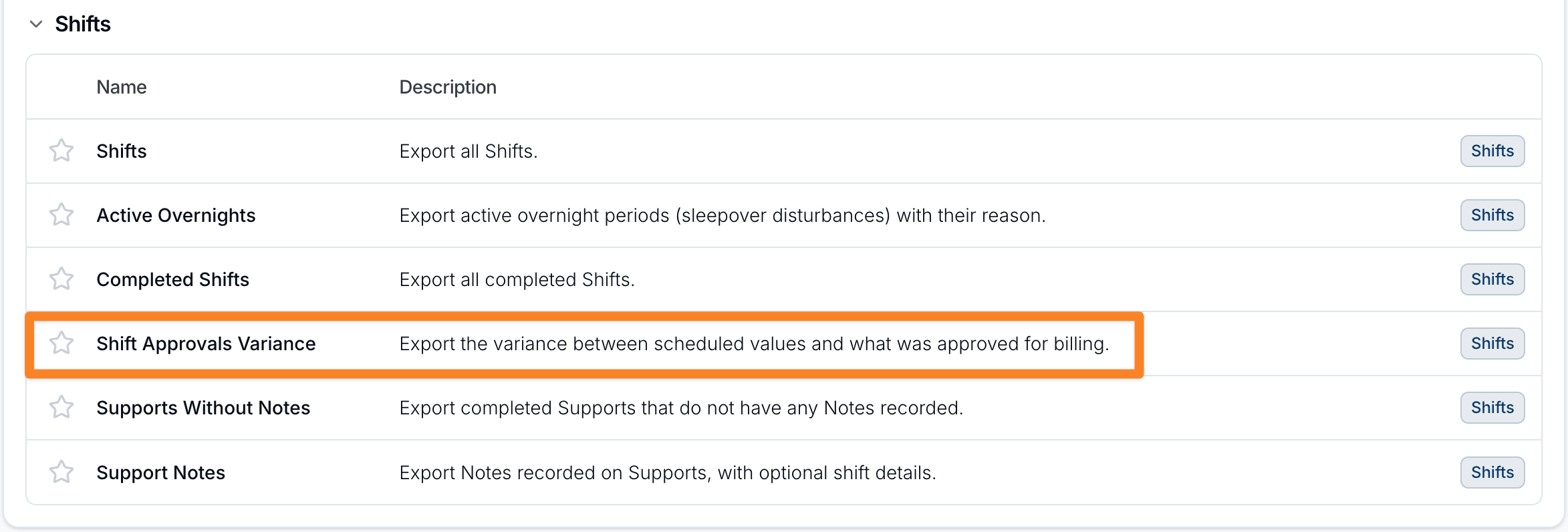
- From the left-hand menu, select Exports.
- Scroll to the Shifts section.
- Select Shift Approvals Variance.
Configuring the Export
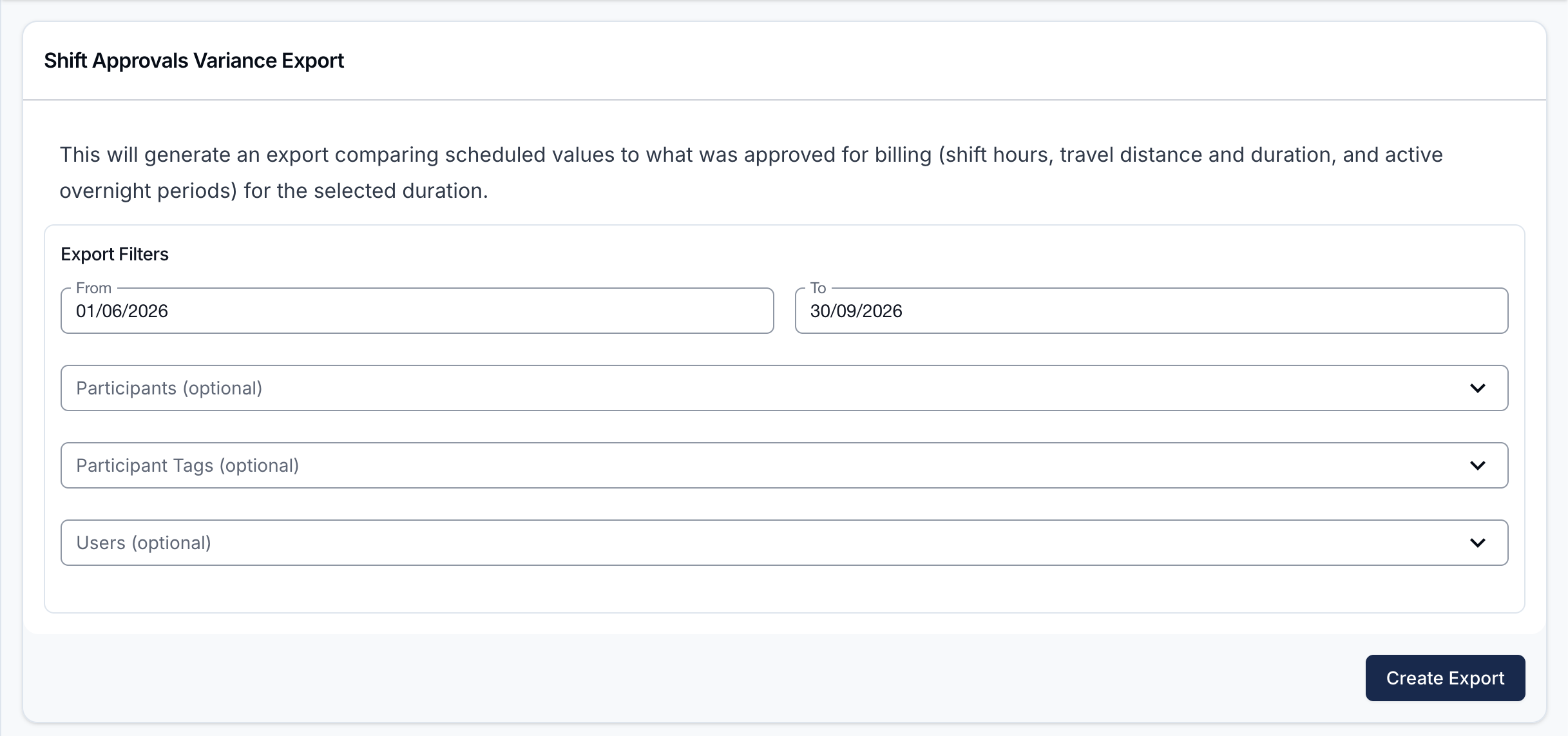
Choose the From and To dates, then optionally narrow the export with the following filters.
Participants
Select one or more specific Participants to include. Leave this field empty if you want to select Participants by tag or include everyone.
Participant Tags
Select one or more Participant Tags to include every Participant who carries any of the selected tags.
The Participants and Participant Tags fields work independently or together:
- Participants only - includes the individually selected Participants.
- Participant Tags only - includes all Participants who carry any selected tag.
- Both fields - includes Participants matched by either field, without duplicates.
- Both fields empty - includes all Participants, subject to the other filters.
Users
Select one or more Support Workers to include only their shifts. Leave this field empty to include all rosterable Users, subject to the other filters.
Creating and Downloading the Export
Select Create Export. When the CSV is ready, it will appear on the Exports page, where you can select Download.
Exported Fields
The CSV includes:
- Support Worker
- Participants
- Shift Date
- Row Type
- Travel Type
- Shift Type
- Scheduled Start Time
- Scheduled End Time
- Approved Start Time
- Approved End Time
- Start Variance (minutes)
- End Variance (minutes)
- Scheduled Value
- Approved Value
- Value Variance
- Reviewed By
- Reviewer Source
- Reviewed At
- Approval Note
- Comments
Providers using multi-timezone scheduling also receive a Timezone column.
Each included shift produces an Hours row. Travel produces a Travel Distance or Travel Duration row only when that value was approved. Each approved active overnight period produces an Active Overnight Period row.
- Start Variance (minutes) is the approved start minus the scheduled start.
- End Variance (minutes) is the approved end minus the scheduled end.
- On travel rows, Value Variance is the approved distance or duration minus the scheduled value. Hours and active overnight rows use the scheduled and approved time columns instead.
- Participants names who each row's shift was for, on every row. A group shift lists everyone booked on it, including anyone who cancelled; a flexible group shift lists only the Support Worker's own paired Participants. An Active Overnight Period row names only the Participant that period was recorded for. Internal shifts leave this blank.
- Shift Date is the shift's scheduled start date, on every row - including Travel Distance and Travel Duration rows, which otherwise carry no date.
- Travel Type appears on travel rows only, and reads To Support, During Support, or From Support, the same Travel Type set on the shift.
- Approval Note holds the note written when that row's approval (hours, travel distance, travel duration, or active overnight period) was reviewed.
- Comments holds the comments added on the Shift Approvals screen for the shift, oldest first, with who wrote each one and when. They appear once, on the shift's Hours row.