- Insights
- Referral Conversion Report
Referral Conversion Report
The Referral Conversion Report shows how many referrals you received and where they ended up - converted, declined, still open or archived - month by month.
Where to find it
- From the left-hand menu, select Reports.
- Under Referrals, select Referral Conversion - or open the Referral Conversion Report.
Use the selector in the top right to choose the reporting window: Last 12 months, Last 24 months or Last 36 months. It opens on the last 12 months. Each window counts the current month to date as one of its months, so Last 12 months runs from the 1st of the month 11 months ago up to today.
Filtering by Source
Use the Source selector in the top right, next to the period selector, to filter the whole report to referrals from one source - for example Social Media, Word of Mouth or NDIA or LAC. It opens on All sources. Choose No source to see referrals with none recorded.
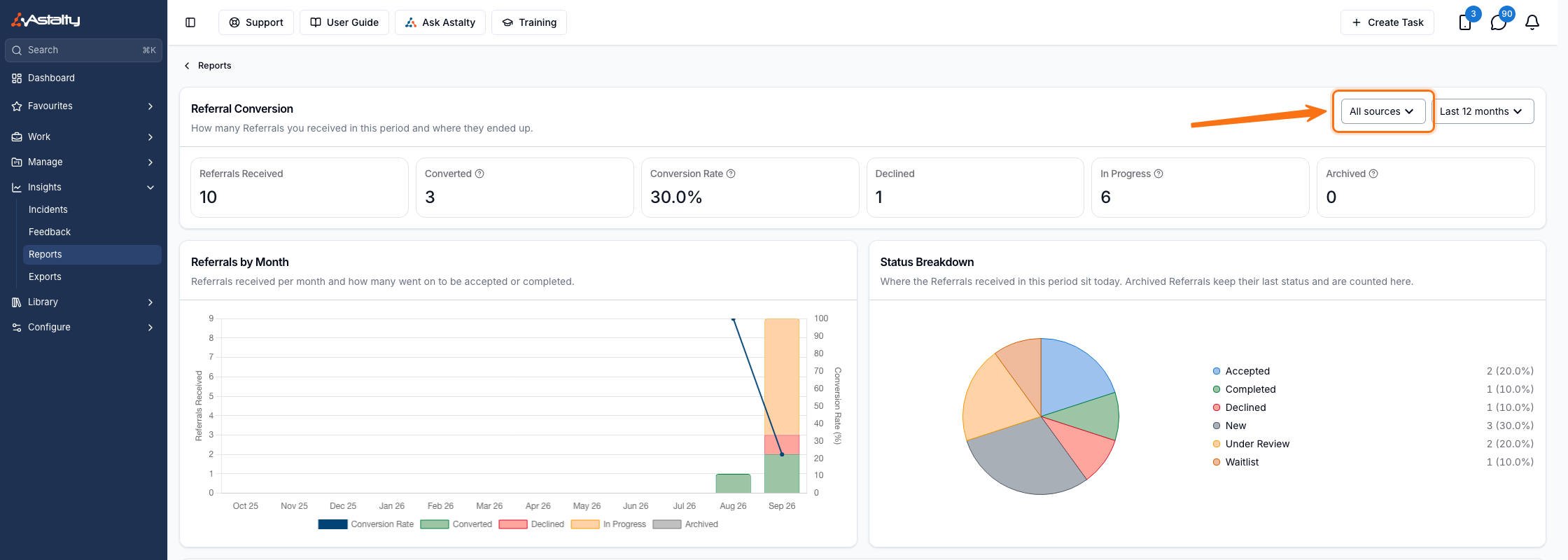
A referral takes its source from the question linked to Referral Source on its form, or from staff setting it on the referral. Filtering by Source applies to every figure, chart and table on the page - not just the Conversion by Source table below. See Conversion by Source for how sources compare without using this filter.
How a referral is counted
A referral belongs to the month it was received - the date the referral was created in Astalty - and is then classified by the status it holds today:
| Outcome | Referral status |
|---|---|
| Converted | Accepted or Completed |
| Declined | Declined |
| In Progress | New, Under Review or Waitlist, and not archived |
| Archived | Archived while still New, Under Review or on the Waitlist |
Archiving only changes the outcome of a referral that was still open. A referral declined and then archived still counts as Declined, and Accepted and Completed referrals can't be archived at all.
Because outcomes are read as at today, each month's conversion rate follows that intake forward - it isn't the conversions that happened during that month. The most recent month is still working through, so its rate will rise.
The summary figures
Six figures sit across the top, covering the whole selected window:
| Figure | What it means |
|---|---|
| Referrals Received | Referrals created during the period |
| Converted | Those now Accepted or Completed |
| Conversion Rate | Converted as a proportion of all referrals received in the period |
| Declined | Those now Declined |
| In Progress | Those still New, Under Review or on the Waitlist |
| Archived | Those archived while still open, so they never reached an outcome |
Converted, Declined, In Progress and Archived add up to Referrals Received.
The charts
Referrals by Month stacks each month's referrals by outcome, with the conversion rate drawn as a line against a second axis running to 100%.
Status Breakdown splits the period's referrals by the status they sit at today - Accepted, Completed, Declined, New, Under Review and Waitlist - with the count and share beside each. An archived referral keeps its last status here, so it still appears under New, Under Review or Waitlist.
Conversion by Source
While All sources is selected, a Conversion by Source table breaks the period down by where each referral came from:
| Column | What it shows |
|---|---|
| Source | Where the referral came from, or No source |
| Received | Referrals from that source created in the period |
| Converted | How many are now Accepted or Completed |
| Declined | How many are now Declined |
| In Progress | How many are still open |
| Archived | How many were archived while still open |
| Conversion Rate | Converted as a proportion of that source's Received |
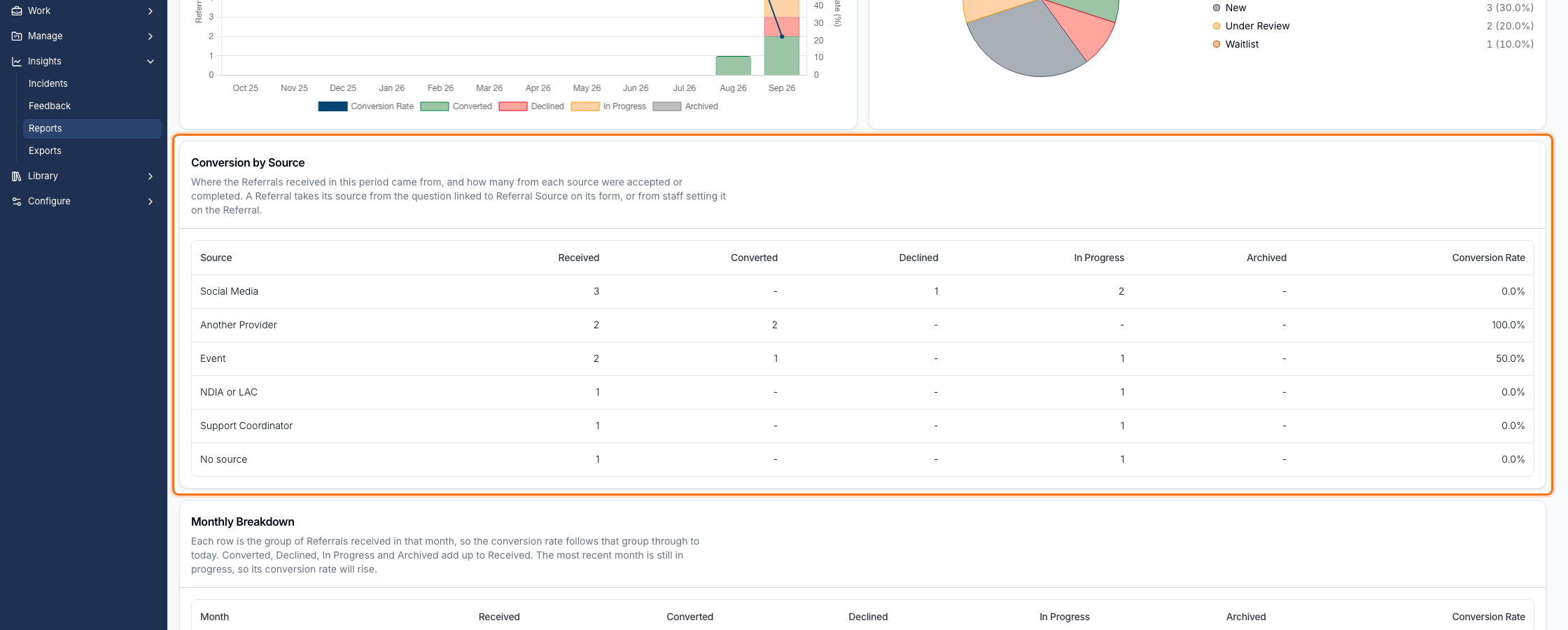
Every column except Source can be sorted. This table only appears while All sources is selected - select a specific source in the filter above to see that source's figures in the summary and charts instead.
Monthly Breakdown
The final table gives the underlying numbers per month:
| Column | What it shows |
|---|---|
| Month | The month the referrals were received |
| Received | Referrals created that month |
| Converted | How many of that month's referrals are now Accepted or Completed |
| Declined | How many are now Declined |
| In Progress | How many are still open |
| Archived | How many were archived while still open |
| Conversion Rate | Converted as a proportion of that month's Received |
Every column except Month can be sorted. A dash means zero, or - in Conversion Rate - that no referrals were received that month.
Things to keep in mind
- Rates are shown to one decimal place.
- Months with no referrals still appear, as a row of dashes.
- The report covers every referral on your account. It isn't filtered to the referrals assigned to you, and the period and Source are the only filters.
- There's no export or download - the figures are read on screen.
- Where nothing was received in the period - or none from the selected source - the report says so instead of showing the charts and table.