Adding Supported Independent Living (SIL) or Assistance with Self-Care Shifts
Overview
Set up the Participant's Service and Charge Item Set before scheduling Assistance with Self-Care or Supported Independent Living (SIL). The charging method depends on whether you bill by the hour, by the week, or across different support types.
Creating Supports
Start by checking that the required Charge Item Sets are available.
Set up Charge Item Sets
Astalty includes presets for Assistance with Self-Care and Supported Independent Living. Open Settings > Charge Items, select Add Charge Item Set, then choose a preset. Review its name, reference and hourly charges before selecting Create.
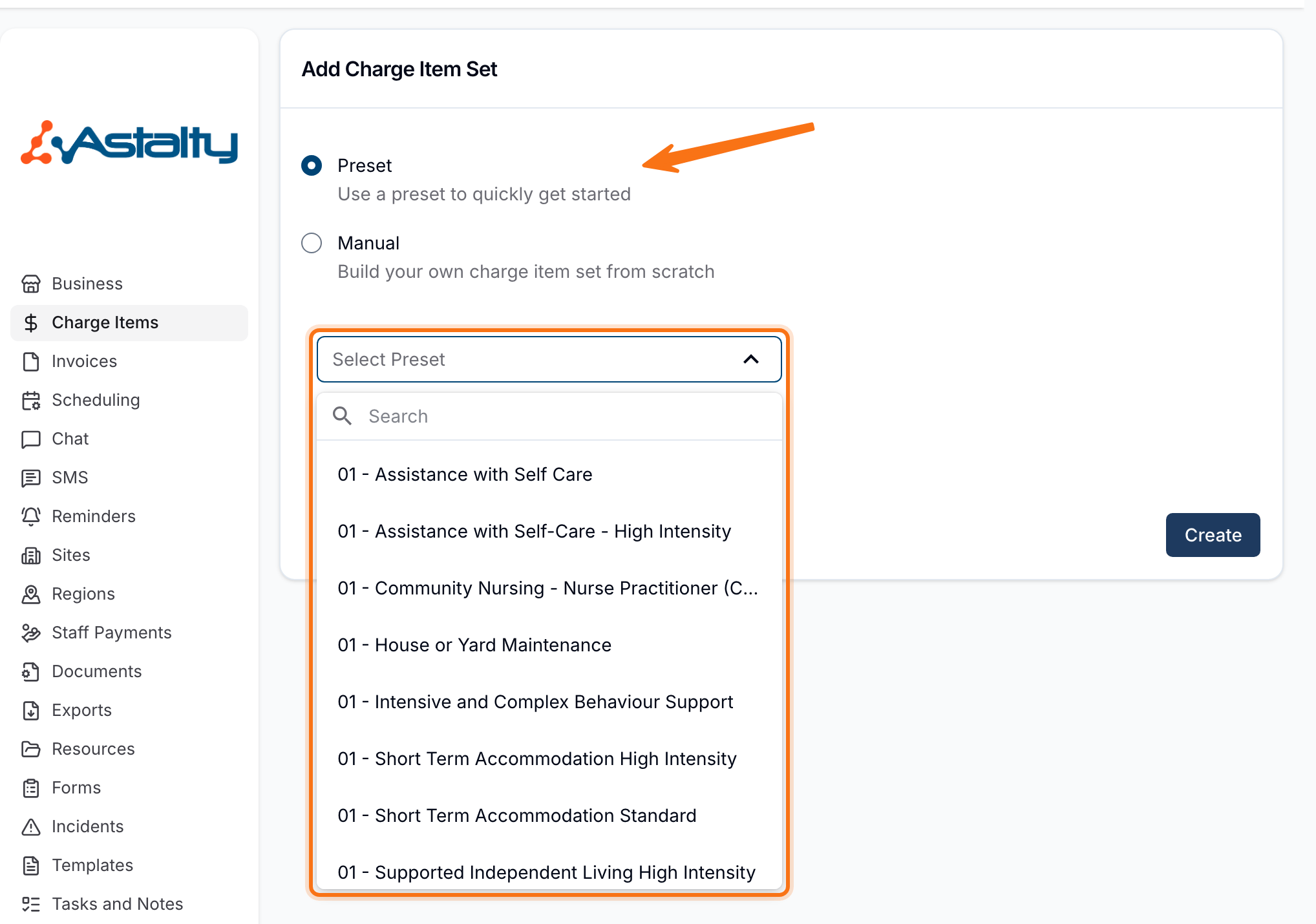
See Creating and Updating Charge Item Sets for the full setup process.
Update Participant Services
Open the Participant's profile and select NDIS Plan. Add a Scheduled Service, then choose the support category, enter the Service name and budget, and select the Charge Item Set. Save the Service before scheduling shifts.

See Creating a Service for field details.
Schedule Shifts
Use recurring shifts when the support follows a regular pattern. Later changes can apply to selected occurrences in the series.

The Adding a 1:1 Shift and Adding a Group Shift guides outline the process of creating shifts, with more detail on adding shifts to a sequence in the Recurring Shifts guide.
Hourly Charged SIL
For hourly billing, select Automatic Charges so Astalty can create the support and travel charges from the recorded shift details.

Weekly Charged SIL and Manual Charges
For SIL services that are charged weekly, manual charges should be selected under Charge behaviour when setting up the Support, not automatic charges. We recommend setting up all shifts in the support sequence, and then creating Recurring Direct Charges in the Finance menu. These charges will then appear in your invoice batches each week.

Create a Charge Item for weekly SIL charges, then select it on the Participant's Service before using it in Direct Charges. See Creating and Updating Charge Items.

You can find more information on how to set these charges up in the Direct Charges guide.
Adding Sleepovers or Overnight Support
These types of supports often require a sleepover or active overnight component. Instructions for adding these can be found in the Adding a Sleepover or Active Overnight Support guide.
Split Billing and Manual Charge Considerations
In some scenarios, support delivery may change mid-shift (for example, a shift that includes both Assistance with Self-Care and Community Access). In these cases, manual charge mode must be enabled when creating the support, and the shift should be split into separate charges to reflect the different support types.
You'll find more on how to set this up in the Adding a 1:1 Shift and Adding a Group Shift guides.
Supported Independent Living & Assistance with Self Care - Video Walk-Through
In this video, you'll learn how to set up and manage shifts for Participants receiving Supported Independent Living or Assistance with Self-Care, with guidance on scheduling regular supports and handling common setup scenarios.