Billed Time on Support Charges
Overview
A support that bills through more than one window - using Support Time Segments, a Sleepover Window, or a Flexible Group Support - can list several charges on its Finance tab with the same Charge Item and date. Without anything to tell them apart, they read as duplicates.
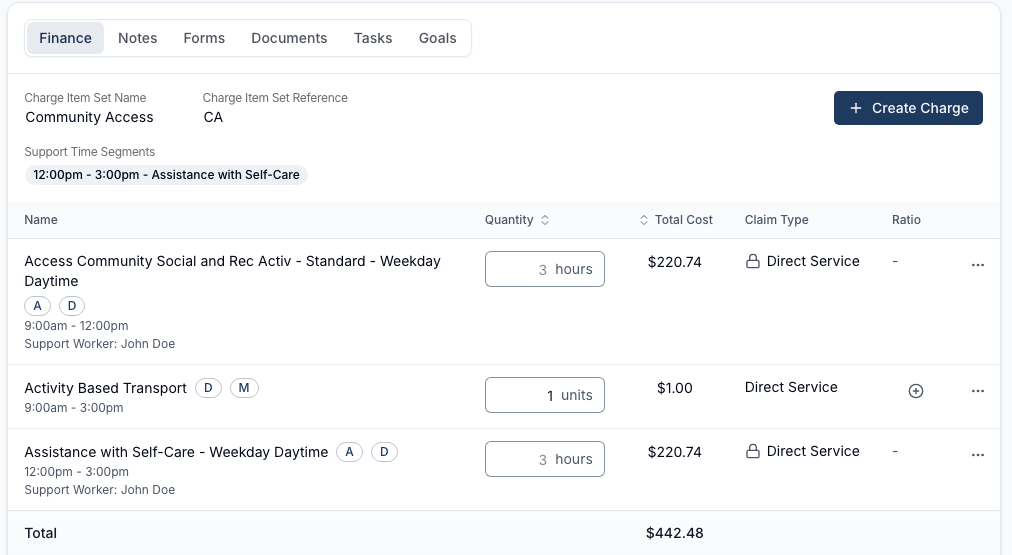
On a support like that, each charge shows the part of the support it bills - for example 9:00am - 12:00pm - on a line under the charge name, above Support Worker.
When the Time Shows
The time only appears when the charges on screen bill different parts of the support, so you can tell them apart. On a support that bills as one block, every charge covers the same window, and the line is hidden - repeating the support's own time on every charge would add nothing.
Reading the Time
The time is shown as a range, for example 9:00am - 12:00pm. On a support that runs past midnight, the day is added to both ends, for example Thursday 10:00pm - Friday 6:00am - the same format used for Support Time Segments chips and the Sleepover Window badge.
Travel charges don't show a billed time in this list.
Related Pages
- Support Time Segments - splitting one support's time across different Charge Item Sets.
- Sleepover Window - billing the active hours either side of an overnight sleepover separately.
- Adding a Flexible Group Shift - billing each worker's blocks against different Charge Item Sets.
- Service Dates on Support Charges - the Date column shown on the same Finance tab table.