Read Receipts
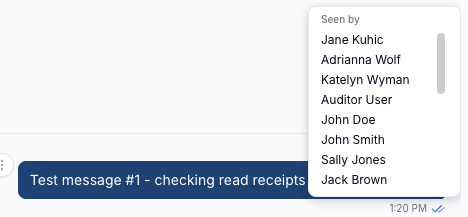
Every message you send in Chat carries a read receipt - a small tick indicator next to the message time. Hovering over it shows you exactly which members of the conversation have read the message and which have not, so you can tell at a glance who has not yet opened an announcement or an urgent request.
Where to Find Read Receipts
Read receipts appear on the messages you have sent, directly to the right of the message time underneath the message bubble. You will not see a receipt on messages sent by other team members - receipts are only shown to the sender.
To see the breakdown, hover over the tick icon on your message.
What the Ticks Mean
The tick icon itself tells you the overall status of the message without needing to hover:
| Icon | Meaning |
|---|---|
| A single grey tick | The message has been sent, but nobody else in the conversation has read it yet |
| A grey double tick | Some, but not all, members of the conversation have read the message |
| A blue double tick | Everyone else in the conversation has read the message |
Seen By and Not Yet Seen By
Hovering the tick icon opens the breakdown, which splits the other members of the conversation into two lists:
- Seen by - members who have read the message
- Not yet seen by - members who have not read it yet
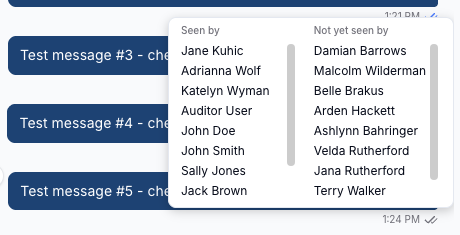
Only the lists that apply are shown. Before anyone has opened the conversation you will see just Not yet seen by, and once everyone has caught up you will see just Seen by. In a large channel each list scrolls, so you can work through the full set of names.
Read receipts work the same way in Direct Messages and Group Channels. In a direct message the breakdown lists a single name; in a group channel it lists every other member, which is what makes it useful for checking who has picked up an announcement.
How Astalty Decides a Message Has Been Read
A member moves into Seen by once they open the conversation after your message arrived. Opening a conversation marks everything in it as read up to that point, so a member who opens a busy channel is recorded as having read every message waiting in it - including yours.
Receipts update live. If you are looking at a conversation while a colleague opens it, their name moves from Not yet seen by to Seen by without you needing to refresh.
Read receipts are not shown on deleted messages.
Read Receipts in the App
The tick indicator also appears on your own messages in the Support Worker app, showing a blue double tick once everyone else in the conversation has read the message. The named Seen by and Not yet seen by breakdown is only available in the web browser version of Astalty, so open Chat in your browser when you need to see exactly who is outstanding.