- Day-to-Day
- Sites
Sites
Sites Overview
Overview
Sites give you a central place to manage the physical and operational locations where your organisation delivers services — SIL houses, day programs, respite properties, or offices. Each site is a container for the Participants assigned to it, the compliance records you need to keep on file, the operational information your Support Workers need on shift, and any forms attached to that location.
With Sites, you can:
- Create and manage a list of physical or operational locations
- Assign Participants to a site, with a capacity indicator showing current occupancy
- See funding utilisation for every Participant at the site on one screen, with over/underspending status
- Track compliance records (certificates, licences, inspections) with expiry dates and status indicators
- Store information items (lockbox codes, bin collection days, preferred tradespeople) that on-shift Support Workers can reference
- Upload site documents and attach forms for use in site context
- Apply tags to organise and filter your sites
Key Concepts
Site Type
Every site has a Type that determines how it behaves within Astalty. You can choose between:
- SIL House — a Supported Independent Living home. SIL House sites support a capacity limit, a Schedule tab for shifts delivered at the site, and all standard site features.
- Other — any other location such as a day program, office, or respite property. Other sites do not have a capacity or Schedule tab, but still support records, Participants, information items, documents, and forms.
Capacity and Occupancy
For SIL House sites, capacity is the maximum number of Participants you intend to have assigned to the site. Occupancy is the number of Participants currently assigned to the site. This is displayed as a simple count - for example, 3 / 4 means three Participants are currently assigned out of a capacity of four. Capacity is a guideline. Astalty will warn you if an assignment brings occupancy above capacity, but it won't prevent you from over-assigning.
Site Records vs Information Items
Sites support two different kinds of stored information, each serving a different purpose:
Site Records are compliance documents with an issue date, an expiry date, and attached files — for example a fire safety certificate, building insurance policy, or pest inspection report. Astalty automatically tracks each record's status based on its expiry date:
- Current — the record is active and has not expired
- Expired — the record's expiry date has passed
- Archived — the record has been manually archived
- Missing — the site is required to have a record of this type, but none has been created yet
You can also set up Site Record Notifications to alert your team before or after a Site Record expires.
Site Information Items are a place to store practical, day-to-day information that Support Workers may need when they're on shift. — for example a lockbox code, bin collection day, or the name of a preferred tradesperson. Information items don't expire and aren't gated by document requirements. They're reference data.
Accessing Sites
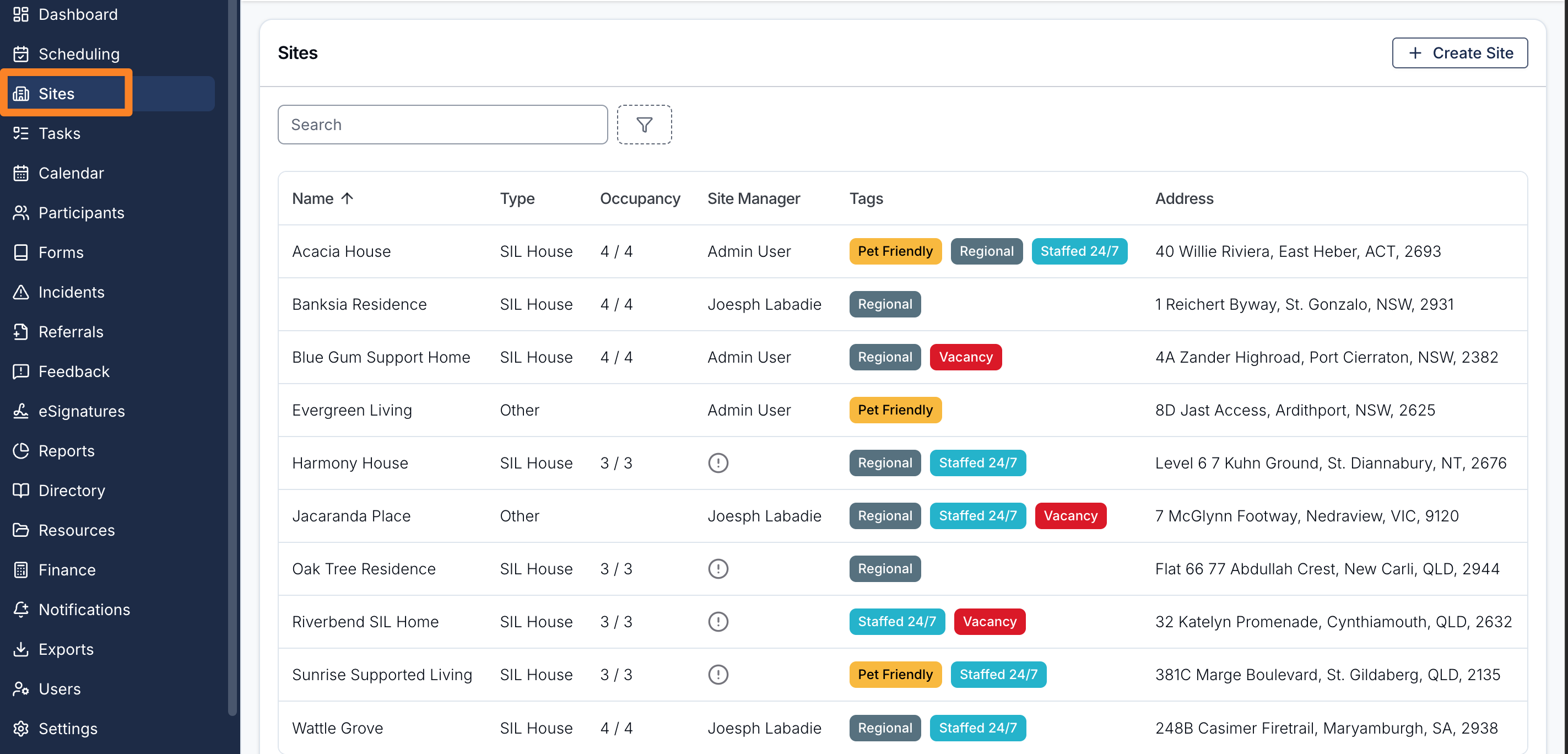
To access Sites, click Sites in the left-hand menu. This takes you to the Sites list, where you can see every site in your organisation, search and filter the list, and create new sites.
The Sites List
The Sites list displays the following columns:
- Name — the site's name
- Type — SIL House or Other
- Occupancy — shows the current number of Participants assigned against the site's capacity (for example, 3 / 4)
- Site Manager — the user assigned to manage this site, if any
- Tags — custom labels applied to the site
- Address — the site's address
You can filter the list by Type, Site Manager, or Tags. Click Create Site in the top right to add a new site.
The Site Detail Page
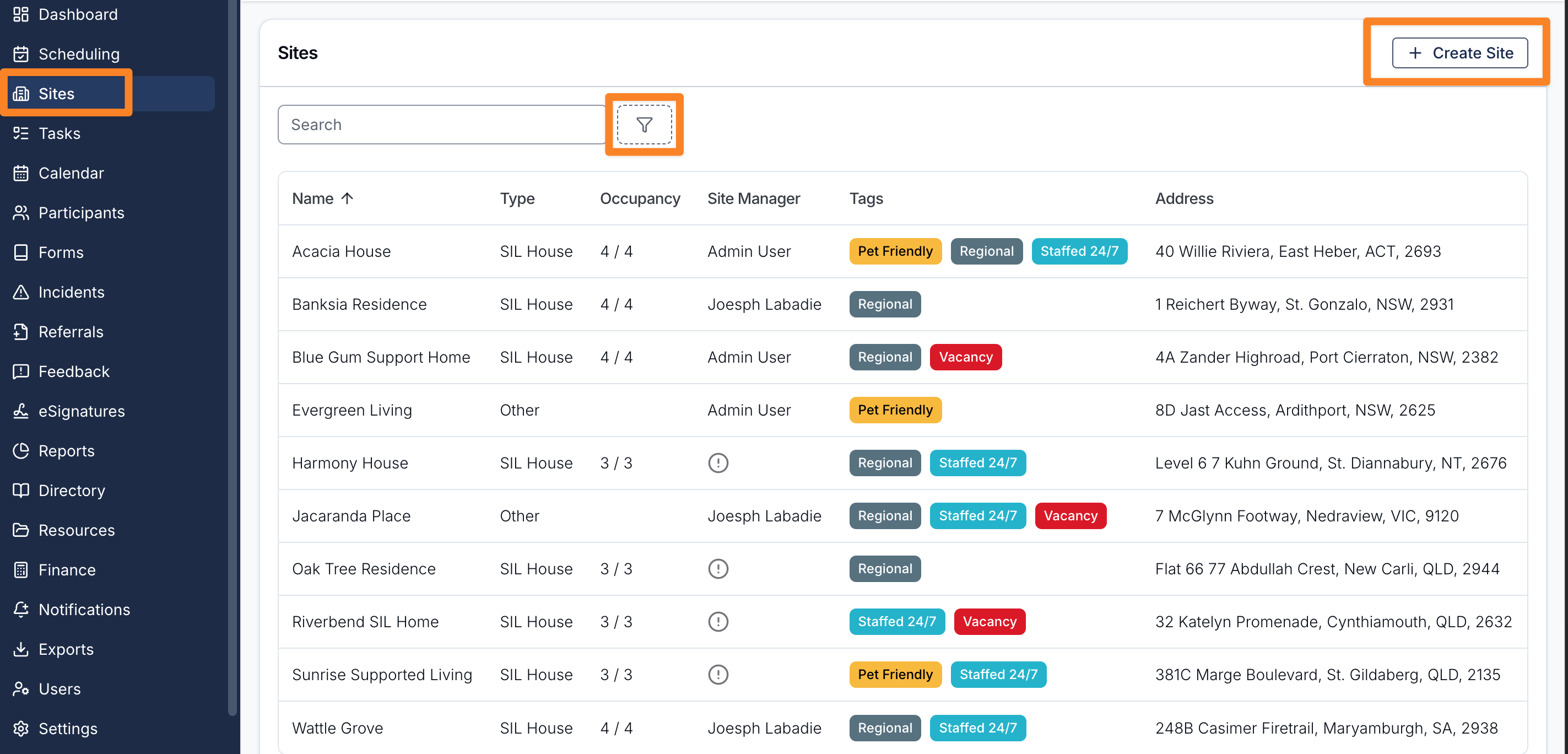
Clicking a site in the list opens the site detail page, organised into tabs. The tabs shown depend on the site's type and your permissions:
- Overview — the site's name, type, address, capacity, manager, description, and tags
- Schedule — shifts delivered at the site (SIL House sites only)
- Participants — the Participants assigned to this site
- Documents — general files attached to the site
- Forms — forms associated with the site and submissions made in site context
- Records — compliance records for the site, with status indicators
- Recurring Charges — recurring direct charges linked to the site (only shown when the Direct Charges feature is enabled)
The sidebar alongside the tabs shows the site's name, type and photo. See Site Photo for how to add, change or remove it.