User Acknowledgements
Overview
The Acknowledgements tab on a staff member's User profile lists the Participant Records they've been asked to acknowledge, with status and how long each has been outstanding.
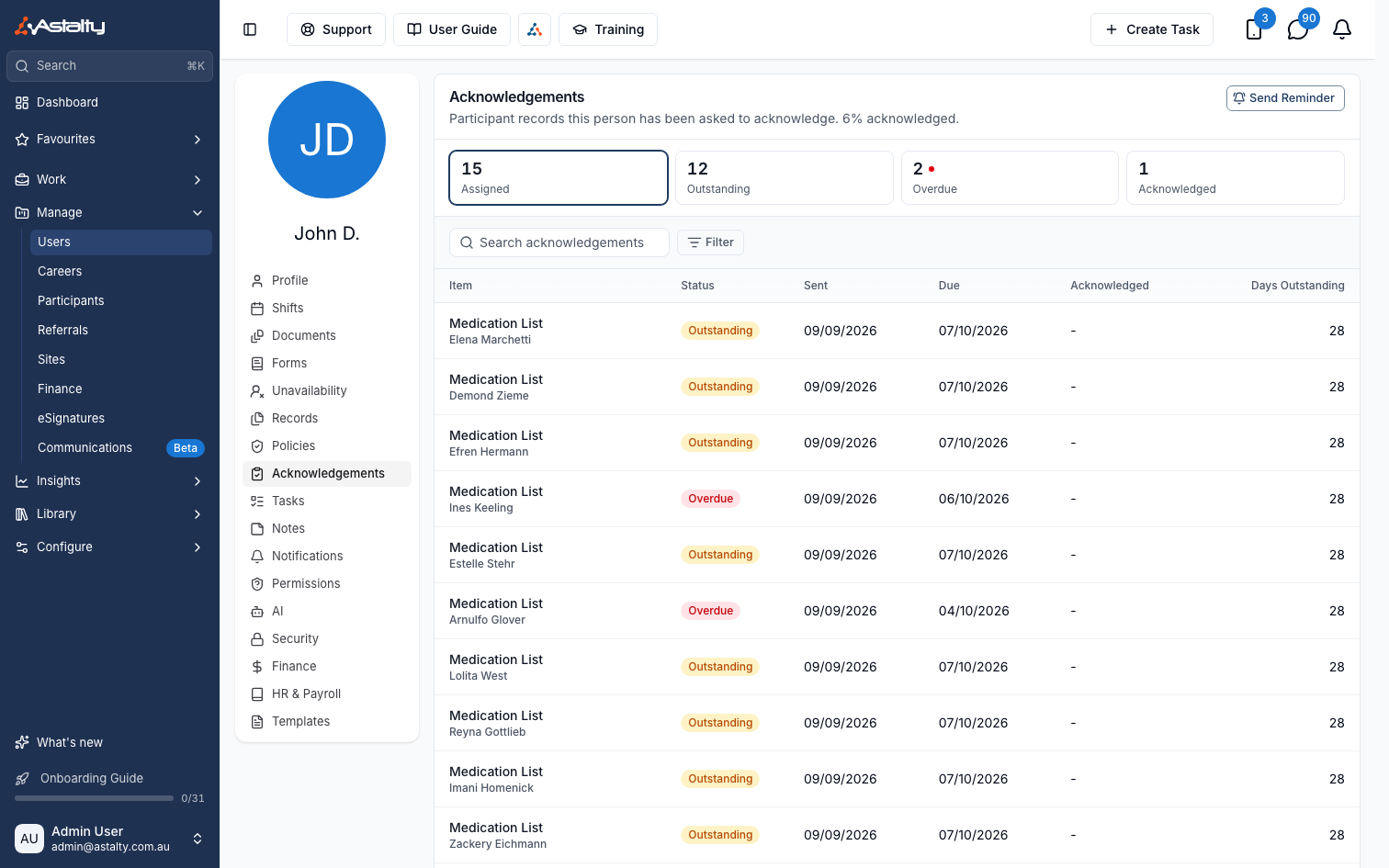
Four tiles summarise their Records - Assigned, Outstanding, Overdue, Acknowledged - click one to filter the table to that status. Search by Record, Participant or Record Type name, or use the Status filter.
The table shows, per Record:
| Column | Shows |
|---|---|
| Item | Record name, with the Participant and Record Type underneath |
| Status | Outstanding, Overdue, or Acknowledged |
| Sent | When the Record was assigned to this person |
| Due | The shift date the Record is tied to |
| Acknowledged | When the person acknowledged it, blank until they do |
| Days Outstanding | Days since Sent, blank once acknowledged |
A Record is Overdue once its shift date has passed without acknowledgement, otherwise it's Outstanding.
Sending a Reminder
Click Send Reminder to notify the person about every outstanding Record they still have to acknowledge. The button only appears while something is outstanding.
To set which Records require acknowledgement, see Record Acknowledgement. To download acknowledgement data, see the Record Acknowledgements Export.