Group Support Ratios on Invoices
Overview
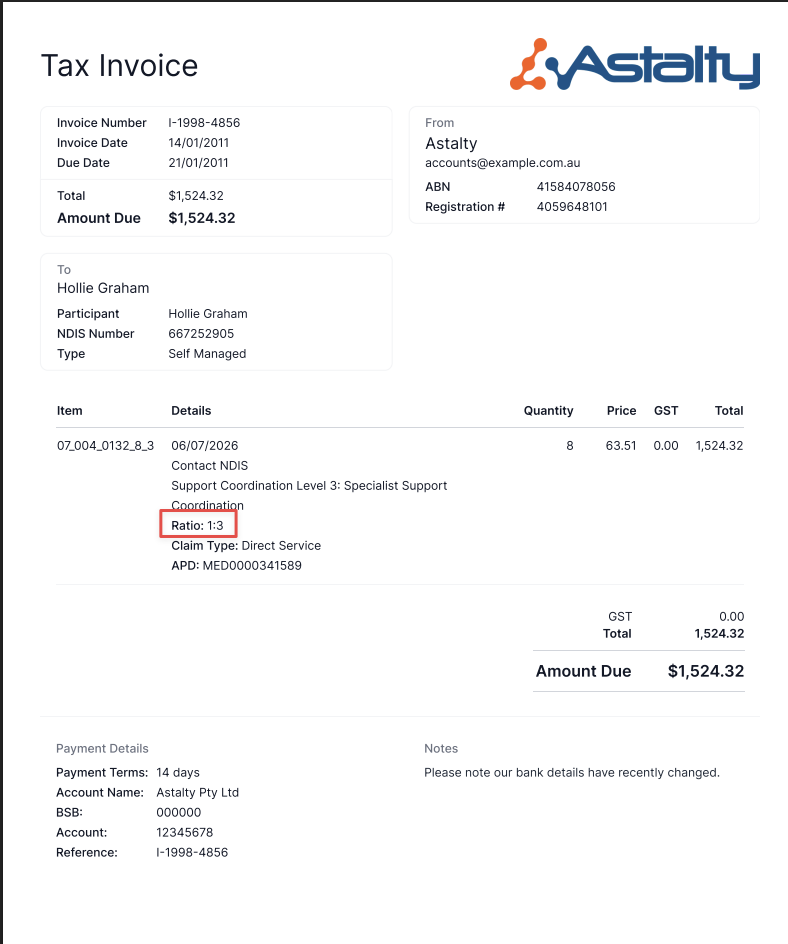
When a support is delivered to a group of Participants, the cost of the support is split between them using a billing ratio (for example, 1:3 for one Support Worker to three Participants). Invoices now show this ratio directly on the affected line item, so Participants and Plan Managers can see how a shared support was split.
The ratio appears as a Ratio line directly under the support item name:
When the ratio appears
The ratio line is automatic - there is no setting to switch on, and it applies to invoices as they are generated.
It only appears for group supports where the ratio is not 1:1. Ordinary 1:1 (direct) supports don't have a shared ratio, so their invoices look exactly as before.
The displayed ratio always matches what was actually charged for that line - including any manual ratio overrides applied to the Group Support or to an individual Participant.